

Read this first: triggers are not all available everywhere
An automation belongs to one channel. That decides which triggers you can pick:- Channel triggers only appear on automations built on that channel. A Story reply trigger exists only on Instagram; Cart order received only on WhatsApp. There is no way to put an Instagram trigger on a WhatsApp automation. Build a second automation on the second channel.
- Comment triggers only exist on channels that have comments: Facebook, Instagram and TikTok. WhatsApp, Telegram, SMS and Live Chat are message-only, so nothing on those channels reacts to a comment. Choosing a comment trigger is also what makes the Comment actions steps (reply, like, hide, delete) appear in the builder’s step palette.
- Everything else fires on the event, not on the channel. Contact events, dates, bookings and money events don’t care which channel the automation sits on. When such an automation sends a message, it goes out on the channel the contact was last active on.
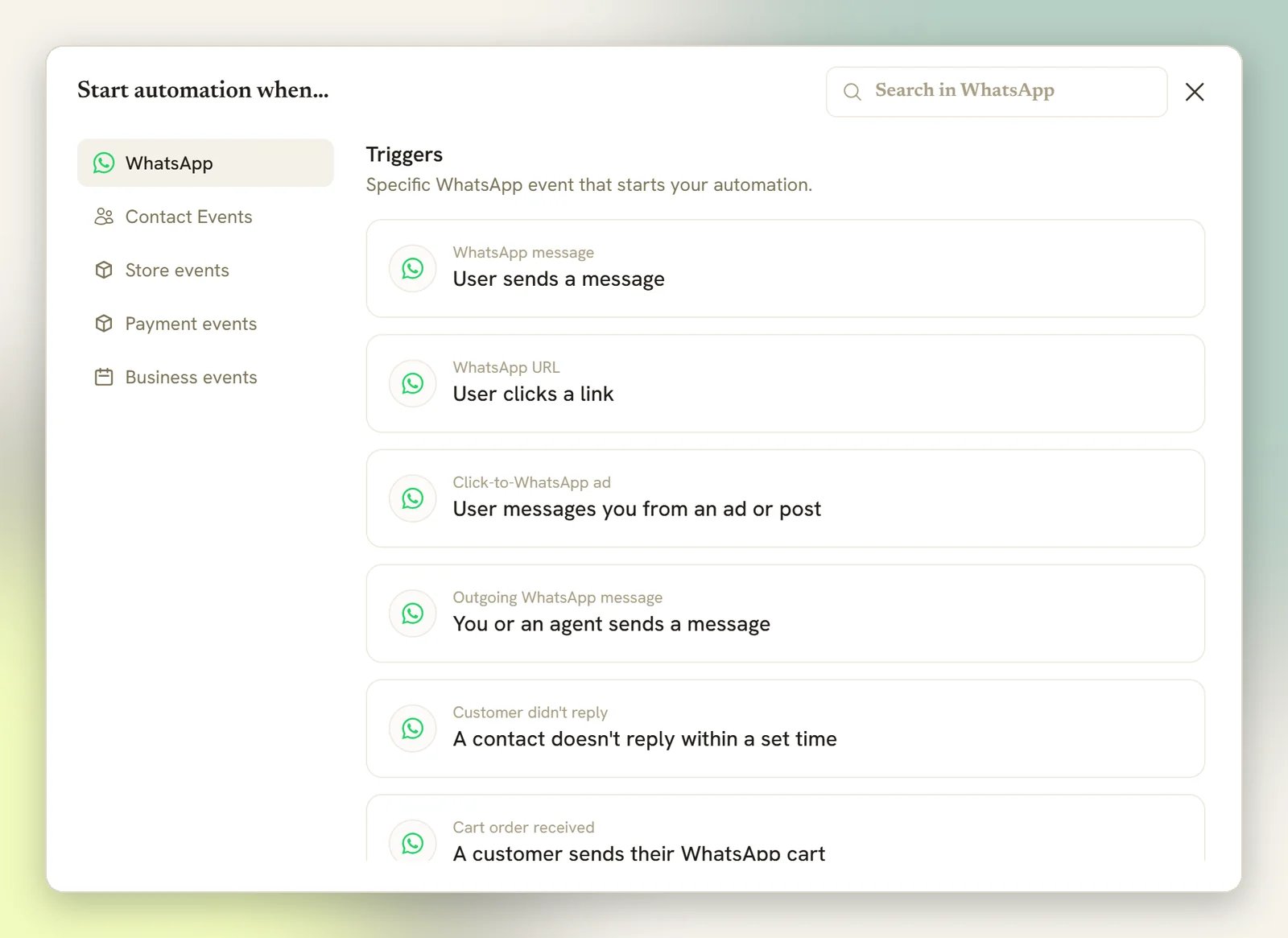
Channel triggers
Cart order received is hidden only if your connected WhatsApp number reports that its cart
is switched off. Otherwise it stays available; an order message can’t reach you any other way.
Choose which posts a comment trigger covers. Comment triggers have a Which posts? setting:
All posts, or Specific posts that you pick from a list. Story reply has the same
setting, labelled Which stories?, with All stories and Specific stories. Story
mentions has none and fires on every mention.
- A comment on a post outside your pick doesn’t start the automation. If no other comment automation runs on it either, DMLY skips the comment, and a commenter it doesn’t already know on that channel doesn’t become a contact.
- Specific posts with nothing picked still fires on every post. Pick at least one, or choose All posts.
- On Facebook, All posts includes your ads. The hint says so: “Every post on your Page, including your ads and ones you publish later.”
- On Instagram, the picker lists your posts and Reels, not your ads. The trigger doesn’t mention ads, and DMLY doesn’t yet promise that comments on an Instagram ad reach it.
Telegram, SMS, Live Chat, TikTok and Google Business
SMS is text-only. An SMS automation can send a message and ask for a reply (no images, no
buttons), so the builder only offers the steps SMS can actually deliver.
Outgoing message triggers
Most channel triggers fire when a contact messages you. Four channels also have an outgoing trigger that fires when the message goes the other way, when you or a teammate replies: Outgoing WhatsApp message, Outgoing Messenger message, Outgoing Instagram message and Outgoing TikTok message. Each one is described in the picker as “You or an agent sends a message”. They’re built for the follow-up, not the reply: tag a contact once a person has handled the chat, start a satisfaction question after an agent answers, or pause the bot the moment someone steps in. What starts it, and what doesn’t. The trigger fires on a message a person sends: a reply typed in the inbox (on the web or in the mobile app) or a message sent through the DMLY API. It does not fire on anything your automations send: a flow’s message step, a quick automation, a sequence, a broadcast, an AI reply, or a booking or invoice notification. Those are how DMLY messages for you, and none of them count as an outgoing message here. That distinction is also what prevents a loop. An outgoing-triggered flow can itself send a message, but a flow’s own sends never fire the trigger, so a flow can’t start itself again off the message it just sent. Narrow it by who sent it. An outgoing trigger has one setting, Sent by:
Here “bot / API” means a send through the DMLY API, not your automations, which never reach this
trigger whichever option you pick. There is no keyword box on an outgoing trigger, so it can’t be
narrowed to particular words.
What the flow receives. The contact is the person the message was sent to (the recipient, not
a new inbound contact), so
{{first_name}} and the other contact tokens resolve to them. The
{{text}} token holds the message you just sent, not something the contact said. A send that fails,
and a reply posted to a public comment thread, don’t fire the trigger; only a delivered direct
message does.
Click-to-WhatsApp ads
When somebody taps an ad that opens a WhatsApp chat, Meta tells DMLY which ad it was. Click-to-WhatsApp ad is the trigger that acts on it, so a person who arrived from an offer gets answered with that offer instead of a generic hello. The picker describes it as “User messages you from an ad or post”. Your organic posts count too: a tap on a post that opens a WhatsApp chat carries the same stamp, so a flow on this trigger answers those as well. Which ad starts this? is the trigger’s only setting.
An ad ID looks like
120209428414010371. The builder’s hint says where to get it: “Runs when
somebody messages you from an ad or post. You can find the ad ID in Meta Ads Manager.” The
ads report groups its rows by the same ID, so you can copy it off the row
for the ad you want. It has to be the ad’s own ID: a campaign or ad set ID never matches.
There is no keyword box on this trigger. It matches on where the person came from, not on what they
typed.
What the flow can say back. The ad rides along with the conversation, so the first message out
can quote it: {{ad.headline}} is the headline the person tapped, and there are tokens for the body
copy, the ad’s ID and the creative. See the ad tokens.
The contact record picks the ad up as well. Their Source reads WhatsApp ad: Summer Sale, named
after the ad’s own headline, and the first ad that brought them in keeps the credit: a later ad
doesn’t take it over, and a source you set by hand is never overwritten.
Two live flows on Any ad on the same number both match, and only the older one ever answers.
Nothing warns you when you publish the second, because the
publish-time guard doesn’t compare ad triggers. Keep one Any ad
flow per number and pin the rest to a specific ad.
Triggers that work on any channel
These don’t belong to a channel. They fire on the event itself.Scheduled date
Scheduled date fires when a date and time you set arrives (one-off or recurring) and runs for an audience you choose rather than for one contact who just messaged you. Use it for a Monday morning reminder, a monthly check-in, or a seasonal offer. If what you want is a one-off message to a list, a broadcast is the simpler tool; reach for Scheduled date when the message needs branching, a delay, or steps that depend on the contact.Birthday / key date
Birthday / key date fires when a contact’s birthday or another key date arrives. The date comes from the contact record, so this only reaches contacts who actually have that date filled in. See custom fields.Conversation closed
Conversation closed fires when a conversation is marked done or resolved in the inbox. It’s the natural place for a follow-up: a satisfaction question, a review request, or a tag that feeds a later segment.Contact events
Tag applied and Tag removed can’t be narrowed to one specific tag from the builder yet,
and Field changed can’t be narrowed to one specific field; each fires for any tag or any
field that changes.
A CSV import starts no contact-event automations: no New contact, Tag applied, Tag
removed or Field changed, however many rows it creates or updates. You don’t need to pause
anything before a big import. Workspace webhooks (
contact.created, contact.tagged) still fire
for imported rows. See Migrate to DMLY.Sales, money and bookings
The rest of the picker covers the things your business does, split across three tabs (Store events, Payment events and Business events), and all of it is channel-independent.Store events
These fire from a connected Shopify or WooCommerce store. Every one of them can be narrowed with filters (which store, order totals, currency and more), covered with the store steps in Store automations.
The shipment triggers (in transit, out for delivery, delivered, ready for pickup, delivery failed)
come from Shopify’s fulfillment updates.
Payment events
These are payments through your connected payment gateway: a pay link, an invoice, a paid booking.Payment failed appears on two tabs and they are not the same event. The one under
Payment events is a failed payment on your DMLY gateway; the one under Store events
is a failed payment in your online store’s own checkout.
Business events
The picker describes this tab as an Appointments, Finance, or Offerings event in DMLY. Invoices and orders. See Invoices and Orders:
Subscriptions. See Subscriptions:
Subscription plan changed can fire twice for one change, because a plan change happens in two
steps. Switching a client onto another plan immediately fires it once. Scheduling the switch
for the next renewal instead fires it when you schedule it, and again when the renewal comes round
and the new plan actually takes effect. So a flow on this trigger that messages the client sends
twice for a scheduled change. See Subscriptions.
Credits, coupons and stock. See Plans and credits and
Coupons and loyalty:
Product stock low and Product back in stock here are about your own
Offerings catalogue. The near-identical Inventory low and
Product back in stock on the Store events tab are about your Shopify or WooCommerce
store. Pick the tab that matches where the product actually lives.
Keywords
Message triggers can be narrowed with keywords, on both builders. This is trigger setup, not a different kind of bot; there is no separate “keyword bot”.- With no keywords, the automation replies to every message on that channel. That’s the default, and it’s the single most common cause of a bot answering when you didn’t want it to.
- Matching ignores capitals, and any one keyword matching is enough.
- In the flow builder you also choose how the keyword has to match: Any message (no keyword filter), Message contains a keyword, Message is an exact match, or Message starts with a keyword. Quick automations have no such choice: a quick automation with keywords always matches on contains.
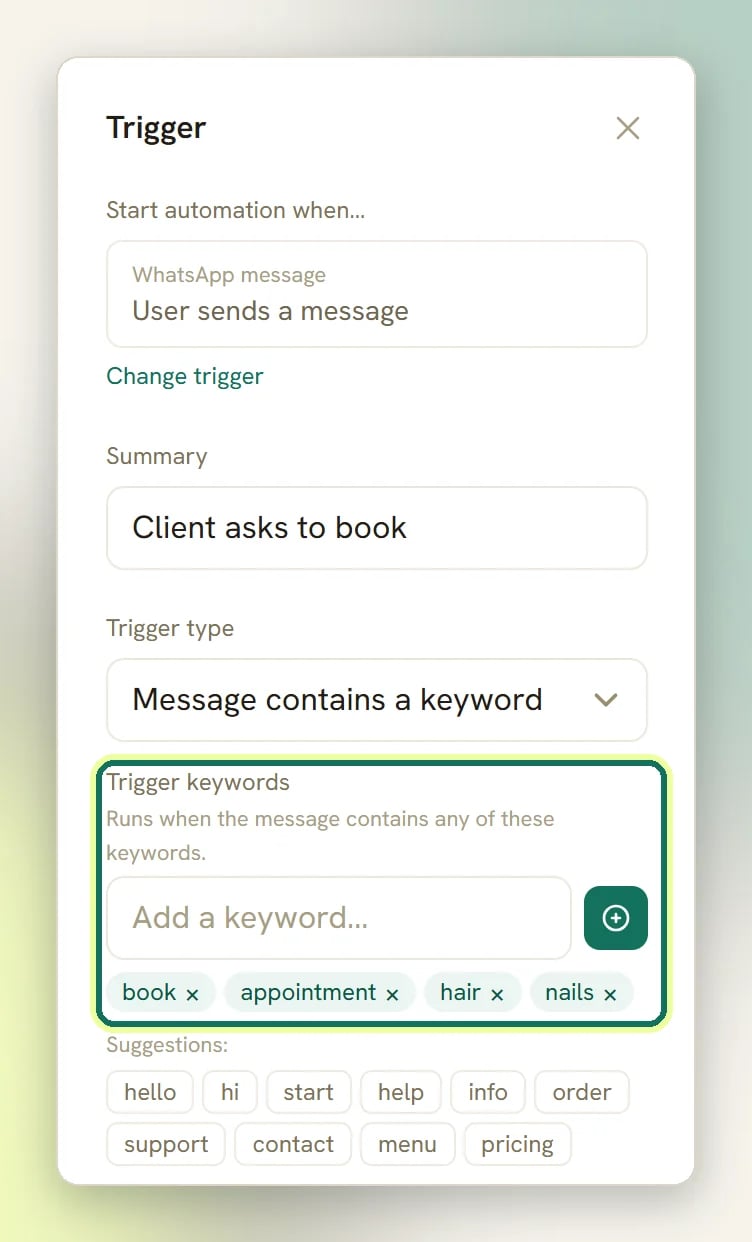
Telegram message is the exception: the flow builder hides the keyword box on it entirely, so
a Telegram flow built there answers every message.
When more than one automation matches
The answer depends on whether a message arrived or something happened.A message or a comment: one automation answers
A customer who sends one message gets one bot answer, however many automations match it. Out of every Active flow-builder automation on that channel whose trigger and keywords match, DMLY starts:- every matching automation that never messages the contact. A flow that only tags, updates a field, syncs a CRM or calls a webhook isn’t competing for the reply, so all of them run.
- exactly one of the automations that would reply. The most deliberate match wins, in this order: a flow pinned to A specific ad, then a flow on Any ad, then keywords (an exact keyword beats starts with, which beats contains, and any keyword at all beats a catch-all). Longer keyword beats shorter on the same setting. Still tied (two catch-alls, say) and the older automation wins.
Quick automations are a fallback, not a competitor. When no flow answered the message, every quick
automation on the channel whose keywords match then runs, and those aren’t arbitrated: two matching
quick automations do both reply. The exception is a WhatsApp cart order: the selected flow runs,
and every matching Cart order received quick automation runs too, whether or not a flow
answered.
An event: every matching automation runs
Nothing arbitrates the triggers that aren’t answering a message. Contact events, dates, Conversation closed, store events, payment events, every business event and the outgoing message triggers start every active automation that matches, and the contact receives whatever each of them sends. Two flows on Invoice paid that both message the client means the client is messaged twice.The publish-time guard
DMLY blocks the obvious version of this when you publish: if another automation on the same channel already answers the same trigger and either both reply to everything or they share a keyword, publishing is refused and the message names the other automation. The check leaves the Click-to-WhatsApp ad trigger out of it, so two flows on Any ad publish without complaint and only the older one answers. See Click-to-WhatsApp ads. It ignores Which posts? as well. Two catch-all automations on the same comment trigger and channel are refused even when each is pinned to a different post, and so are two that share a keyword. Give one of them a keyword of its own to publish both.The same check runs when you switch a Paused automation back on, from the list toggle or the
API. If another Active automation on the channel already answers the same trigger, and both
reply to everything or they share a keyword, switching it on is refused and the message names
the other automation.
Runs quietly: the override for a flow that shouldn’t count as the reply
DMLY works out on its own which automations are competing for the reply: a flow with no step that puts anything in front of the contact is treated as quiet and runs alongside whichever one answers. Sometimes that reading is wrong, and the bottom of every trigger’s settings carries the override: Runs quietly (never counts as the reply), a checkbox, off by default. The builder explains it as “Only one automation answers a message. Tick this so it runs alongside whichever one replies — it is detected automatically for automations that only tag, sync or call a webhook.” Tick it when a flow that does send something should still not be the one answer to the message: a flow that notifies your team, posts to Slack and also drops a one-line acknowledgement, say, or a step whose message goes somewhere other than this conversation, like Send SMS. Without the tick, that flow enters the contest and can take the reply away from your real responder.Why a trigger didn’t fire
The automation isn't live
The automation isn't live
A trigger is only considered when the automation is Active and has a published version.
Saving a draft changes nothing for your customers. See
publishing bots. Publishing also opens a fresh draft, so what you
edit next is the next version; the live one keeps running until you publish again.
The contact is mid-conversation with another flow
The contact is mid-conversation with another flow
If the contact is already waiting on a question from any flow, their next message answers that
question instead of starting something new. Only after that message fails to resolve does DMLY
look for a matching trigger.
Another automation took the reply
Another automation took the reply
Only one automation answers an inbound message or comment, so a second flow that also matched
never started. The most specific keyword wins, and a catch-all loses to any real keyword. If the
flow you expected is the more general one, that’s why. See
when more than one automation matches, and tick Runs
quietly on the flow that shouldn’t be competing.
The bot is paused for that contact
The bot is paused for that contact
When a conversation has been handed to a human, triggers stop starting flows for that contact and
any flow already running freezes rather than fails; it picks up where it left off once the bot
is resumed.
The contact opted out
The contact opted out
A contact who texts
stop (or unsubscribe, cancel, quit, and similar) is opted out, tagged
Unsubscribe, and every running flow for them is cancelled. start opts them back in.It already ran for that contact
It already ran for that contact
An automation can only have one activation in progress per contact at a time, and a flow set to
run only once per contact never starts a second time for them.
A bulk tag action didn't start Tag applied / Tag removed
A bulk tag action didn't start Tag applied / Tag removed
One place deliberately doesn’t fire these: a bulk tag action from the contacts list. Tagging
hundreds of people at once would otherwise start hundreds of automations, so the bulk path
suppresses them on purpose.Everywhere else does fire: the tag toggle in the inbox, an automation’s own
Tag Action step, the AI agent and the tag editor on the contact’s own profile page. A
CSV import doesn’t fire them either: its
tags column starts no
automations. See Migrate to DMLY.Field changed has a related rule: a flow’s own steps that write a field back (User
Input, Sync Contact, and the AI node’s own field updates) don’t fire it on themselves, so
a bot can’t trigger itself in a loop.A Click-to-WhatsApp ad automation didn't answer an ad click
A Click-to-WhatsApp ad automation didn't answer an ad click
Two deliberate refusals account for most of these. Either the flow is set to A specific ad
with the ID box empty, in which case it answers no ad at all, or the person didn’t arrive from an
ad: a hand-typed number, a QR code or a growth link carries nothing that says which ad it was.
Check the ID itself too. It has to be the ad’s own ID, not a campaign or an ad set. See
Click-to-WhatsApp ads.
Nothing is arriving on the channel at all
Nothing is arriving on the channel at all
If no message reaches the inbox either, the problem is the channel, not the
trigger. See no inbound messages and
automation not triggering.
Warnings the builder shows on a trigger
The builder flags a few trigger choices that reliably cause trouble. They’re advice, not blocks: you can still publish.- A workspace notification already fires on this event — clients may receive a duplicate. Review Notification settings. Appears on appointment, invoice and payment triggers that DMLY already sends its own notification for. Either turn that notification off or don’t repeat it here.
- Store-triggered contacts are usually outside the 24h window — start with a WhatsApp Template (or a Checkout Link with a template fallback). A store event says nothing about when the contact last messaged you, and a plain WhatsApp message won’t reach them if it’s been more than a day. See WhatsApp rules and limits.
- Stock triggers such as back-in-stock have no single recipient, so the builder asks you to name a tag whose contacts should be notified.
Next
Flow builder
Build what happens after the trigger.
Templates
Start from a ready-made automation with its trigger already set.
Publishing bots
Drafts, versions, and going live.
Common mistakes
The traps that catch most new automations.