

What each channel supports
Ice breakers are not the same feature on every channel. The biggest difference: on WhatsApp an ice breaker cannot start a flow; it is only a question, with no action attached.Live Chat has no ice breakers at all. The equivalent is Quick replies under
Behavior in the widget customizer. See Live Chat widget.
Facebook, Instagram and Telegram
These three share the same editor: each ice breaker is a Question plus an action, and the action is either Text reply (write the answer to send) or Start flow (pick the flow to run).1
Select the channel
Open Configurations → Bot Setup and select the Facebook page, Instagram account or
Telegram bot in the channel selector.
2
Open Ice breakers
Select the Ice breakers section.
3
Add a question
Select Add ice breaker and replace the question with one a real customer would ask:
What are your opening hours?, I want to book, Do you deliver?. Keep it under 80
characters; anything longer is cut off when it is sent to Facebook or Instagram. On
Telegram the button label is cut at 64, so keep Telegram questions shorter still.4
Choose what it does
Pick Text reply and write the answer, or pick Start flow and choose a flow.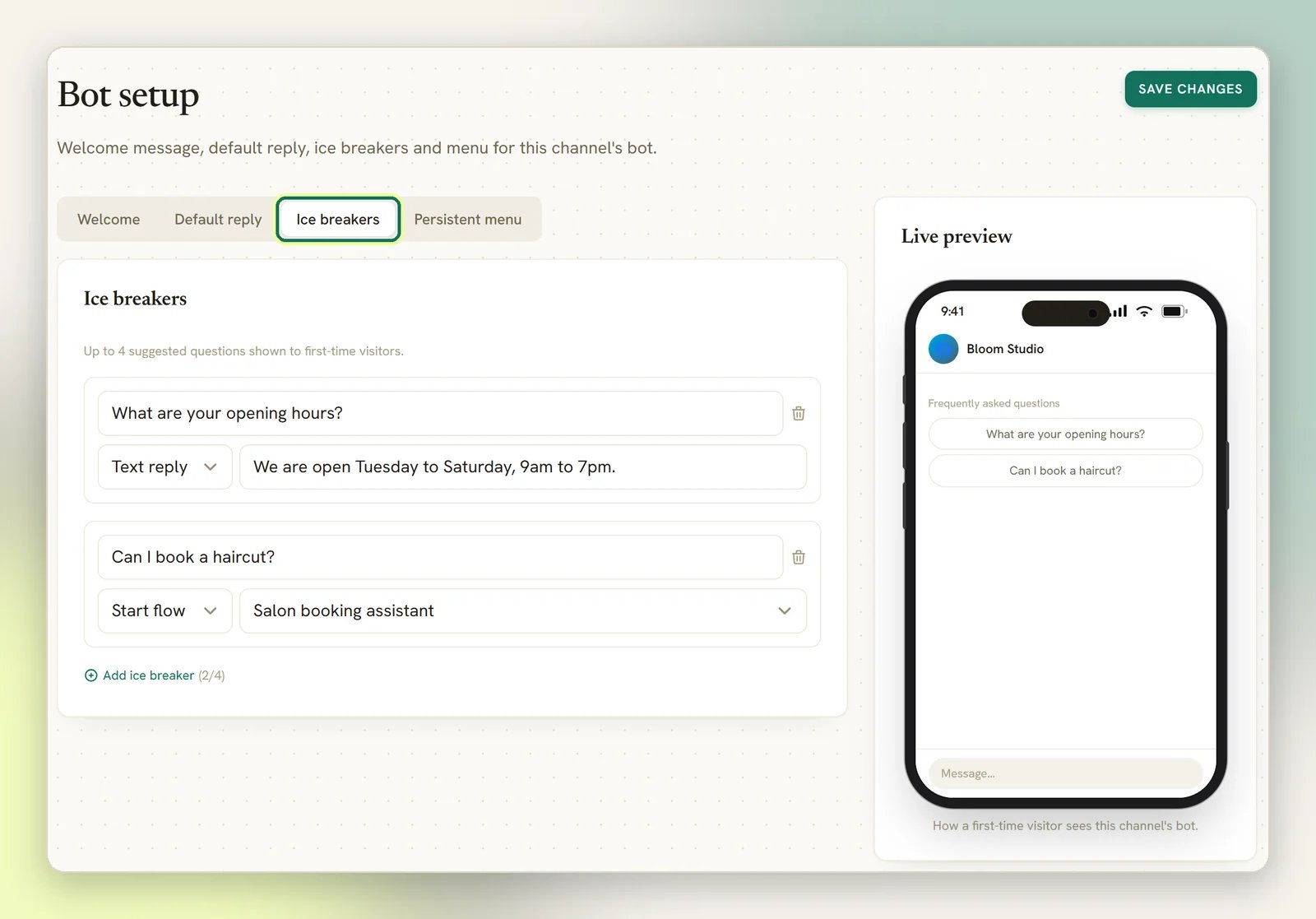
5
Save
Select Save changes. On Facebook and Instagram this pushes the ice breakers straight to
your connected page or account.
Two things that surprise people
Telegram ice breakers ride on the welcome message. They are shown as tappable buttons underneath the message someone gets when they tap Start (/start). If the Welcome section
is switched off, or its text is empty, no ice breakers appear; there is nothing to attach them
to. Unlike Facebook and Instagram, they are never sent to Telegram itself; DMLY adds them as the
welcome goes out.
Instagram shows them on mobile only. They are correct and saved, they just don’t render in
Instagram on desktop.
On Facebook, ice breakers need a Get Started button to appear at all. DMLY sets one for you
whenever you have a welcome, an ice breaker or a menu configured, so there is nothing to do.
- Add the ice breaker
I want to book an appointment. - Build a flow on that WhatsApp channel with a keyword trigger for
book. - Publish it. See Triggers and Publishing bots.
How Start flow works
On Facebook, Instagram and Telegram, the Start flow picker lists the flows that are active flow-builder automations on the selected channel. Quick-form automations and flows built for a different channel don’t appear. A tap starts that flow directly, from its first step. The flow’s own trigger and keywords are irrelevant to the tap; you don’t need to give a flow a keyword just so an ice breaker can reach it. The flow does still have to be published: an active flow with no published version is listed in the picker, but tapping it doesn’t start it. On Facebook and Instagram the tap is then treated as an ordinary message with the ice breaker’s question as its text, so another automation or your default reply may answer instead.On Facebook, Instagram and WhatsApp, ice breakers only show to someone who hasn’t messaged you
before, so they are the front door, not a menu. On Telegram they come back every time someone
sends
/start. If you want a prompt that’s available for the whole conversation, use the
persistent menu instead; its items can start flows too.I saved ice breakers but they don't appear
I saved ice breakers but they don't appear
Work through it by channel:
- Telegram: check the Welcome section is enabled and has text. No welcome, no ice
breakers. They only show on
/start. - Instagram: check on a phone. They don’t render on desktop.
- Facebook / Instagram: saving pushes them to Meta, and a failed push is reported the moment you save, with a message pointing at the logs. Open Logs and look for the sync entry.
- Any channel: an ice breaker with a blank question is skipped. Fill it in or remove it.
- Facebook / Instagram / WhatsApp: you have already messaged this contact. Ice breakers
are for first-time conversations; test with a number or account that has never written to
you. (Telegram is different: just send
/startagain.)
Tapping an ice breaker does nothing
Tapping an ice breaker does nothing
For a Text reply, check the answer field isn’t empty; a blank answer sends nothing of its own. On Facebook and Instagram the question then goes through
as an ordinary message, so another automation or your default reply may answer it.For a Start flow, check the flow is published, not just active. Then check the usual
silent non-starts: the bot is paused on that contact (unpause it from the
Inbox), or the flow is set to respond only once per contact and has already
run for them. See Automation not triggering.On WhatsApp, nothing happening is expected unless a keyword matches; the ice breaker has
no action of its own. See the WhatsApp section above.