

On Instagram the two triggers are interchangeable today: every Instagram comment (feed,
Reel or Live) is checked against automations built on either trigger. Pick whichever
reads better, and don’t build one flow on each expecting them to split the traffic. Both
match the same comments, and only one flow answers each comment: the more specific
keyword match, or the older flow when they match the same way.
- Only brand-new comments fire it. Edited comments and deleted comments do nothing, and your own Page’s or account’s comments never trigger your own automations. Replies under a comment count as comments too; someone answering another commenter can trigger your flow.
- Every comment reaches the Inbox, but a commenter becomes a contact only when it leads somewhere. Each comment threads into the Inbox under Comments, named from the commenter’s username, so your team sees it and can answer it. Whether the commenter also becomes a contact depends on two questions: are they already one, and does a comment automation on that channel match this comment (the right trigger event, the keywords matching if the trigger has any, and the post falling inside the trigger’s Which posts? choice; a quick automation also needs at least one action)? If either answer is yes, they are a contact. If both are no, they are kept comment-only: the comment thread is there, but they are not on the Contacts list, don’t count toward your plan’s contact limit, aren’t in broadcasts or segments, and don’t fire Contact created automations or webhooks. A comment-only person becomes a full contact the moment a later comment matches an automation, or, on Facebook and Instagram, when they DM you. Drive-by commenters used to become contacts and quietly spend your plan’s contact allowance, which is why the check is there. Your contact limit never blocks a commenter who passes the check: they are still added, and your workspace admins get a Contact limit reached alert (at most once a day).
- Comments and DMs from the same person stay in separate threads. On Facebook and Instagram they belong to the same contact but thread separately in the Inbox; you’ll see a comment thread alongside their DM conversation. On TikTok, a commenter and a DMer are separate contacts (TikTok’s API keeps the two identities apart).
- Comment threads are real Inbox threads. Your automated public replies appear there as your Page’s own comments, and your team can answer them by hand.
- A reply from the Inbox is public, and it has no time limit. Typing into Write a public reply… posts a reply under the comment on Facebook, Instagram or TikTok, never a DM, so the 24-hour messaging window doesn’t apply and the composer never locks. The reply always goes out on the Page or account the comment arrived on, whichever channel you have selected. If it can’t be sent there, the reply shows as failed in the thread.
That check cuts both ways. A comment trigger with no keywords on All posts matches
every comment, so every commenter becomes a contact again. Pin it to Specific posts and
only commenters on those posts do. Switch your only comment automation off (or leave it
unpublished) and new commenters stay comment-only: their comments still reach the Inbox,
but none of them is added to your contacts.
Choose which posts it watches
Every comment trigger has a Which posts? setting with two choices:- All posts: comments on any post on the channel, including posts you publish later. On Facebook this includes your ads; see Comments on your ads.
- Specific posts: only comments on the posts you pick. The picker shows your recent posts; select the ones you want.
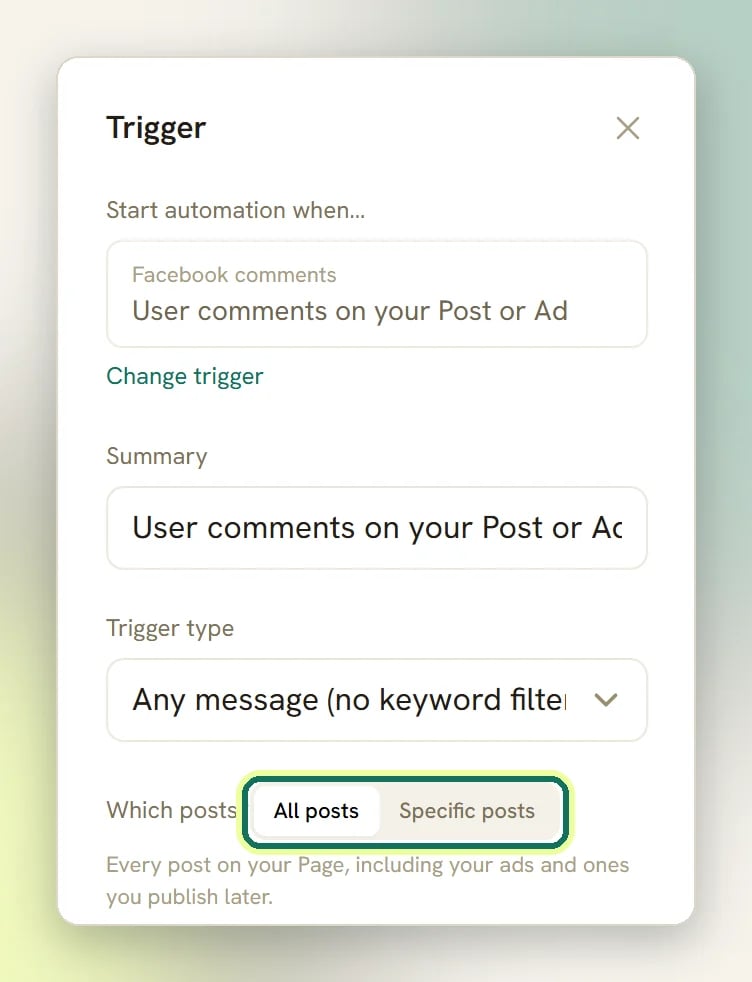
- The match is exact. A comment on any post you didn’t pick fires nothing, and a new commenter there stays comment-only (the comment still reaches the Inbox).
- Specific posts with nothing picked fires on every post, exactly like All posts. The builder doesn’t warn you, so check the count in the hint (“Selected: 0”).
- On Instagram, both triggers see every comment. An Instagram comment is checked against both Post or Reel comments and Live comments automations, each with its own post choice.
- TikTok lists no videos in the picker. In the quick builder that means Specific posts stays empty and fires on every video. The flow builder lets you paste an ID instead.
- Picking different posts doesn’t let two catch-all automations run side by side. Two automations on the same trigger and channel that both have no keywords are refused at publish (“is already active on this channel and also replies to every message”), even when each is pinned to a different post. Two that share a keyword are refused the same way. Give each one a keyword of its own.
Reply to comments automatically
The simplest comment automation: when someone comments, post a public reply under their comment.1
Create a comment-triggered flow
Create a new automation on your Facebook, Instagram or TikTok channel in the
flow builder and pick the comment trigger for that channel,
for example Post or Reel comments on Instagram.
2
Filter with keywords (or don't)
On the trigger, choose how the comment text is matched:
- Any message (no keyword filter): fire on every comment
- Message contains a keyword
- Message is an exact match
- Message starts with a keyword
Price, PRICE and price all match. Leave the
keyword list empty and the automation fires on any comment.The trigger also has Only respond once per contact; turn it on for giveaway-style
automations where each person should only ever get one response, however many times
they comment.3
Add a Reply to Comment step
Comment-triggered flows get an extra palette group, Comment actions, with four
steps: Reply to Comment, Like Comment, Hide Comment and Delete Comment.
(The group only appears when the flow starts from a comment trigger; these steps need
a comment to act on.)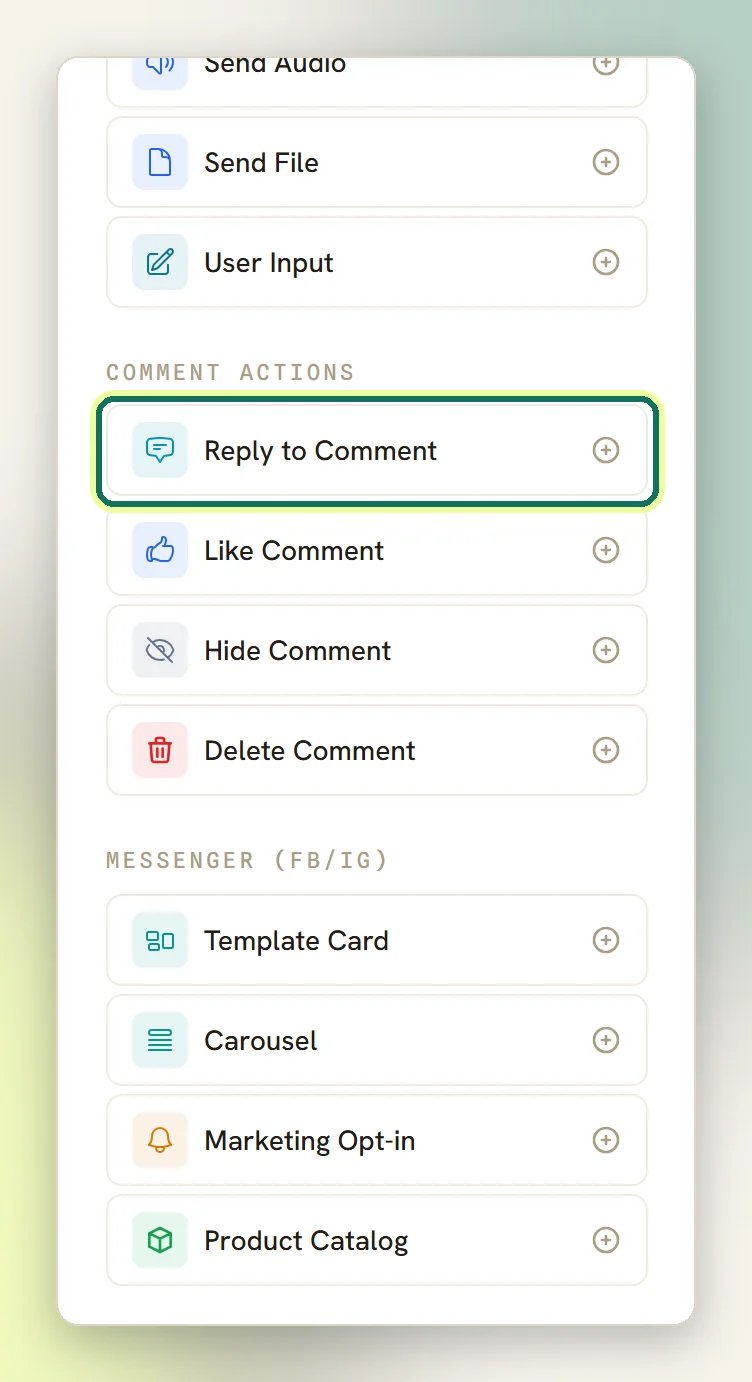
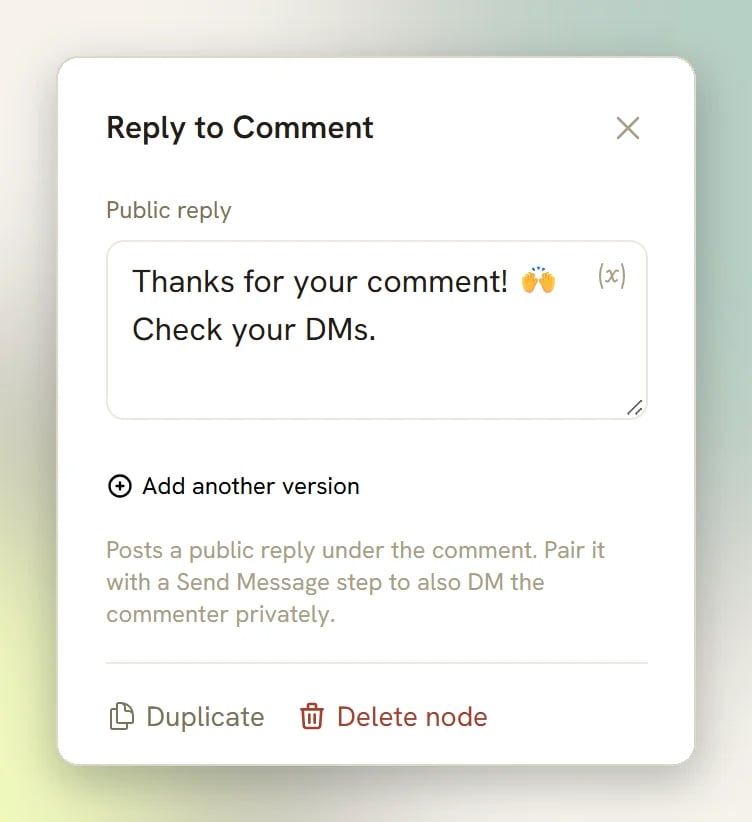
{{first_name}} and the rest), but remember a fresh commenter’s name is seeded from
their username, so {{first_name}} may resolve to a handle rather than a real first
name. The default text is “Thanks for your comment! 🙌 Check your DMs.” Change it if
you’re not also sending a DM.4
Publish and test
Publish the flow, then comment on one of your posts
from a different account; your own Page’s comments never trigger it. The public
reply appears under the comment, and in the Inbox the comment thread shows the reply as
your own comment.
Comment-to-DM
The classic pattern: “Comment WANT and I’ll DM you the link.” This works on Facebook and Instagram: a comment lets you open a DM with someone who has never messaged you.1
Start from a comment trigger with a keyword
Same as above: a Facebook comments or Post or Reel comments trigger, matching
mode Message contains a keyword (or exact match for a cleaner giveaway), keyword
WANT or whatever you announce in the caption.2
Optionally reply in public first
Add Reply to Comment with something like “Check your DMs!”. It isn’t required for
the DM to work, but it tells everyone else scrolling the comments that the mechanic is
real, which is half the point of the pattern.
3
Add the Send Message step
Add a Send Message step with the link or content you promised. In a comment-triggered
flow, the first message the run sends is delivered as a private reply to the
comment, a special Meta mechanism that opens the DM thread even though the commenter
has never messaged you, outside the normal 24-hour messaging window.
4
Publish
Publish, announce the keyword in your post caption, and
watch the comment thread and DM land per commenter in the Inbox.
- One per comment. The first message the run delivers uses it, whatever kind of message it is. A send that fails doesn’t use it up, so the next message in the flow tries again. Each new comment is processed exactly once, so there is no way to get a second private reply out of the same comment.
- Buttons and cards can fall back to text. The first message goes out as built, with its buttons, card or image. If Meta refuses that form, DMLY sends it once more as plain text, so keep what matters (the link) in the message text itself.
- A comment doesn’t open the messaging window. Follow-up steps in the same flow are ordinary DMs. For a commenter who has never messaged you they don’t go out: the send fails as outside the messaging window and shows up in Logs. A failed step isn’t retried later; only messages sent after the person replies to your DM reach them. Front-load the message that matters.
Comment-to-DM on TikTok
Comment-to-DM on TikTok
Not possible. TikTok has no comment-to-DM mechanism: a Send a DM step in a
Video comments flow can only deliver to someone who already has an open DM
conversation with you (within TikTok’s 48-hour window); for a pure commenter it fails.
TikTok also keeps commenters and DMers as separate contacts, so there is no thread to
open.What works instead: put the payoff in the Reply to Comment step. The public reply is
the only reliable way to answer a TikTok commenter, so use it to point people at your
bio link or ask them to message you first.
Moderate comments automatically
Keyword-triggered hide and delete keeps spam and abuse off your posts without a human watching the comments.1
Trigger on the words you want gone
Create a comment-triggered flow with Message contains a keyword and list the terms
you moderate: competitor links, slurs, crypto spam phrases. Keep the list specific:
matching is a substring check, so a short keyword like
win also matches “winter”.2
Choose Hide or Delete
They are genuinely different:
- Hide Comment: “Hides the comment from everyone except its author.” The commenter still sees their own comment and doesn’t know it was hidden; everyone else stops seeing it. Good for spam and negativity, because it doesn’t provoke a reaction. Facebook and Instagram only; on TikTok this step is skipped with a note in the thread (“Hiding comments isn’t supported on TikTok — skipped.”), because TikTok has no hide.
- Delete Comment: “Permanently deletes the comment. Use sparingly — this can’t be undone.” Works on all three platforms. The commenter can see it’s gone.
3
Publish and watch the thread
Each moderated comment leaves a quiet system note in its Inbox comment thread (“Hid
the comment” or “Deleted the comment”) so your team can see what the automation did
and to whom.
Message the commenter after moderating
You can chain moderation with a DM. Hide or delete the comment, then privately tell the person why: “We removed your comment because it broke our rules; here’s how to reach us.” This works on Facebook and Instagram, because every comment step lets the flow continue: a hide or delete (even a failed one) never stops the run, and the private-reply DM still targets the original comment. Order matters, though:- Hide, then Send Message: the safe chain. The comment still exists (hidden), so the private reply lands normally.
- Delete, then Send Message: risky. A private reply to a comment that no longer exists isn’t something DMLY guards against, and Meta may reject it. If you want to delete and notify, put the Send Message step before the Delete Comment step: the DM is delivered first, then the comment is removed. Nothing in the builder enforces this ordering; it’s on you.
Comments on your ads
Facebook: yes. Comments on your Facebook ads reach your automations like any other comment, including ads that never appeared on your Page. An automation on All posts already covers them, with nothing to set up. A boosted post is still your original post, so its comments arrive as that post’s comments. Prefer to watch first? This walkthrough builds a comment automation for a Meta ad in the flow builder.
On a Facebook ad, Reply to Comment and the comment-to-DM private reply have been tested
and work. Like Comment, Hide Comment and Delete Comment use the same calls as on
any other post but haven’t been tested on an ad yet.
Instagram: not confirmed. DMLY hasn’t yet confirmed that Instagram delivers comments on
ads, or that they can be answered once they arrive. The Instagram triggers and the post
picker don’t mention ads, and Instagram ads are never listed in the picker. Until that’s
confirmed, keep an eye on your Instagram ad comments in Instagram itself.
Target one Facebook ad
To answer comments on a single ad only:1
Choose Specific posts
On the comment trigger, set Which posts? to Specific posts.
2
Pick the ad, or paste its post ID
If you’ve connected your Meta ad account
in DMLY, your active ads are listed in the
picker, marked Ad in the flow builder. Pick the one you want. Only active ads show,
and ads with no post of their own (such as catalogue ads) never do. Connecting an ad
account depends on your plan.Not listed? In the flow builder, paste the ad’s post ID into Paste a post ID and select
Add. Copy it from the ad posts list in Meta Business Suite. A campaign, ad set or ad ID
from Ads Manager is not a post ID, and DMLY refuses it. The quick builder has no paste box.
3
Pin it again after you edit the ad
The app’s hint warns: “Editing an ad gives it a new post ID, so pin it again.” The old ID
stays pinned and no longer matches, and the automation doesn’t fall back to all posts, so
it goes quiet until you pick the new one.
What works where
Comment automations in the quick builder
Comment automations in the quick builder
The quick builder has the same triggers and equivalent actions (Reply to comment,
Send a DM, Like the comment, Hide the comment, Delete the comment) with
one difference in keyword matching: a flat comma-separated list, always
contains-matching, no match-mode choice (“Comma-separated. Leave empty to trigger on any
comment.”). The DM action uses the same one-private-reply-per-comment mechanism.Which posts? works the same way, with two differences: there is no Paste a post ID
box, so you can only pick from the listed posts, and Facebook ads appear by name without
the Ad badge.If both a published flow and a quick automation match the same comment, the flow wins
and the quick automation does not fire. The quick builder also shows Conditions such
as Comment / message text and First-time contact, and they are checked before the
actions run. Prefer the flow builder for anything beyond a single canned reply.
Troubleshooting
A comment step failed
A comment step failed
A failed reply, like, hide or delete does two things: it writes a system note in the
comment thread (”… failed — see Logs.”) and records an error row in
Logs under the Errors status, with the comment id and the
error Meta or TikTok returned. The flow itself keeps going: a failed comment action
never cancels the rest of the run, so a failed hide doesn’t stop the DM step after it.
The automation never fires
The automation never fires
The usual suspects, in order of likelihood:
- You tested with your own account; the Page’s or business account’s own comments are always ignored.
- You edited an existing comment; only brand-new comments fire the trigger.
- The bot is paused for that contact (a teammate took over the conversation).
- Only respond once per contact is on and that person already triggered it once.
- A previous run for that contact is still active on the same automation; a repeat comment during an active run is suppressed.
- Which posts? is set to Specific posts and the comment was on a post you didn’t pick. Only the picked posts fire it.
- You pinned a Facebook ad and then edited the ad. The app says an edited ad gets a new post ID, so the old pin no longer matches. Pin the ad again.
- The comment was on an Instagram ad. Whether those reach DMLY isn’t confirmed yet (see Comments on your ads).
- The automation was refused at publish because another no-keyword automation is already active on the channel, even if the two watch different posts.
A commenter is in the Inbox but not in Contacts
A commenter is in the Inbox but not in Contacts
That is a comment-only commenter. Every comment reaches the Inbox under Comments, but
the person becomes a contact only when it leads somewhere: they are already a contact, a
comment automation matches the comment, or they DM you. So switching your only comment
automation off, leaving it unpublished, tightening its keywords, or pinning it to Specific
posts all have the same effect: new commenters stay comment-only (on the other posts, for a
pinned automation). Their threads stay in the Inbox and your team can reply; they just aren’t
listed in Contacts or counted toward your limit.Your contact limit isn’t the cause. A commenter who passes this check is added even when
you’re over the limit, and your admins get a Contact limit reached alert.If comments aren’t reaching the Inbox at all, the Page or account probably has no Channel
behind it in DMLY, and every comment on it is dropped. See
Fix a silent Facebook Page or Instagram account.
The public reply worked but the DM never arrived
The public reply worked but the DM never arrived
Look for a send failure in Logs → Errors. Only the first
message a comment-triggered run delivers can reach someone who has never messaged you; if
your DM is a later step, it fails as outside the messaging window. Put the DM first, or
straight after Reply to Comment, which is a public reply and doesn’t count. And on
TikTok, the DM step cannot reach a commenter at all. See the table above.
Triggers
Every trigger, including the four comment triggers.
Flow builder
The canvas, nodes and ports in full.
Publishing bots
Drafts, versions and the activation checks.
Logs
Where every send and comment action is recorded.