

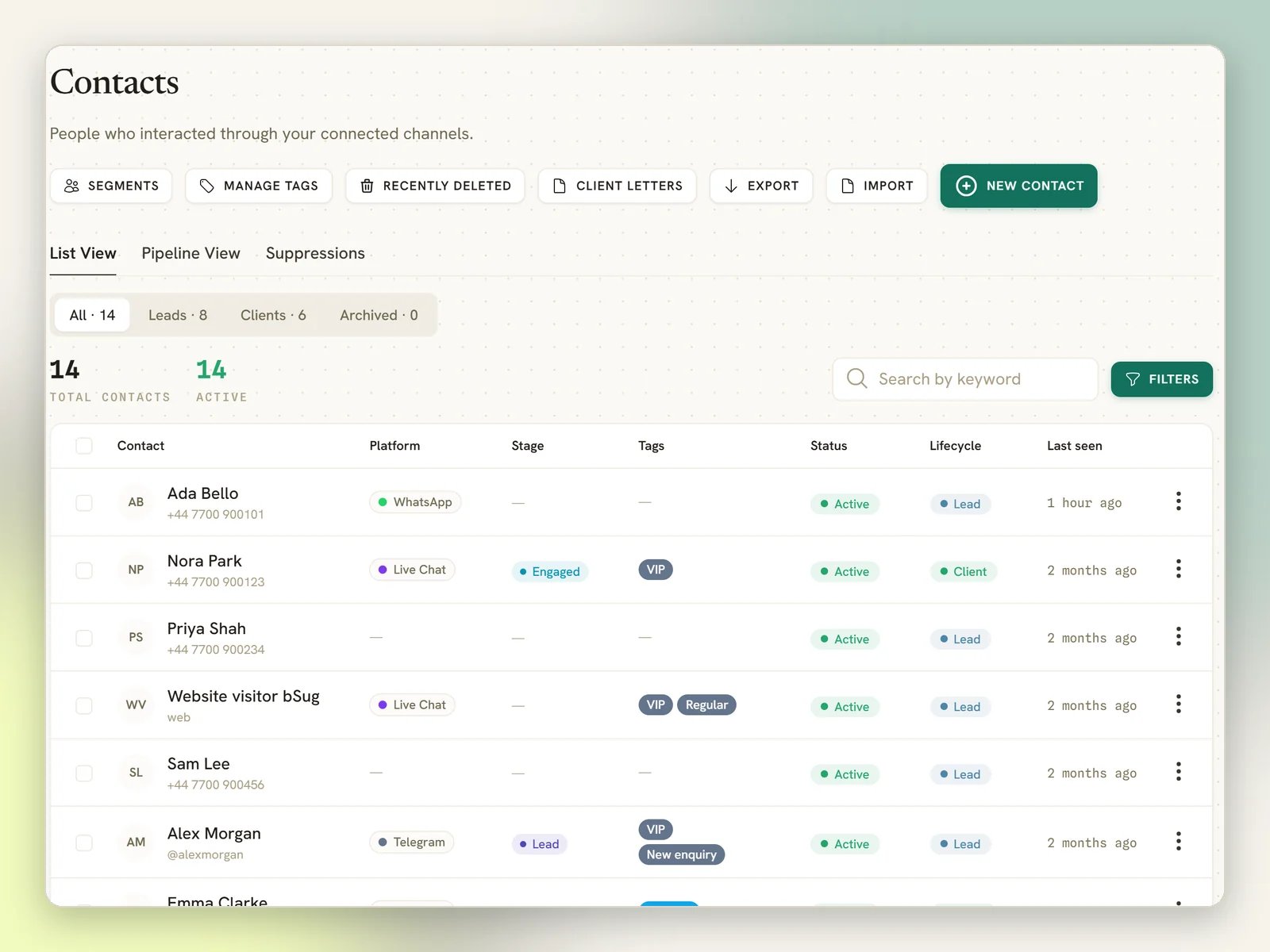
The thing that surprises people first
The same person messaging you on two channels arrives as two contacts.DMLY does not link contacts across channels automatically. An inbound message is matched
against the identities on the channel it came in on, and nothing else, so the customer who
WhatsApps you and later texts your SMS number lands as two contacts, and an Instagram DM
from your best WhatsApp customer lands as a third. Same phone number or not, it makes no
difference here.This is not something you can change from the app. The fix is to merge them. See
When one person becomes two contacts below.
One contact, many identities
Every channel a person reaches you on adds an identity to their contact: one row saying “this person, on this channel, is this id”. A contact can hold several. The contact page lists them under Channels, with the channel they first arrived on marked Primary, and explains the point in a line: “One profile, many channels — replies, history and CRM data are shared.” What each channel uses to identify someone:
The last two need a caveat, because neither one identifies a person the way a phone number does:
- Live Chat keys on the browser. An anonymous visitor is named
Website visitorplus the last four characters of that token until they tell you more, and DMLY keeps the token in the browser’s own storage. So the same browser is the same contact, while a different browser, a different device, a private window or cleared site data each read as a new person. See Live Chat widget. - TikTok uses two different keys. A DM keys on the conversation, a comment keys on the commenter, so the same TikTok person who comments on a video and then DMs you arrives as two contacts. See TikTok.
- Within one channel, that id always maps to the same contact. A customer who messages your WhatsApp number today and again in six months is one contact, not two.
- A person has at most one identity per channel. You cannot end up with the same person twice on the same WhatsApp number.
When one person becomes two contacts
When a message arrives, DMLY looks for an existing identity on that channel. If there is none, it creates a new contact. It does not go looking for a match elsewhere in your workspace by phone number or email: shared and recycled numbers would quietly merge strangers, and a duplicate is the safer mistake. So duplicates happen, and the cure is manual. There are two ways in, and both end in the same merge.From a profile, when DMLY has spotted the duplicate
1
Open either of the two contacts
If DMLY can see a phone number or email in common, a three-dot (⋮) button appears in the
profile header, to the right of Book appointment and the bot-status button. Hovering it
shows Possible duplicates. It is only there when DMLY has found a candidate, so no
button means no suspected duplicate. It matches on an exact email address or the last 10
digits of the phone number, and it scans your 200 most recently active contacts.
2
Open the menu and select the duplicate's name
The menu opens on Possible duplicates, the line “These contacts share a phone or email
with
<contact name>. Merge to combine their channels, history and tags into one profile.”,
then one row per candidate. There is no Merge item; you select the candidate itself.
DMLY shows you which way round it goes before you commit: the duplicate is merged into
the profile you are looking at.3
Confirm with Merge into this profile
All of the duplicate’s channels, messages, notes and tags move across, and the duplicate
is deleted.
From the Contacts list, for any two profiles
Merge is also one of the actions on the bulk action bar, and this route doesn’t need DMLY to have spotted anything: it merges any two contacts you point it at.1
Tick exactly two rows
Merge appears in the bar next to Delete only while exactly two contacts are
selected, and both have to be rows on the page in front of you. Tick a third, or a second
from another page, and the button goes away.
2
Choose which profile survives
Merge contacts opens with both profiles listed under Keep this profile and the one
you ticked first already selected. Pick the other if you want it kept instead. The line
above the list spells out which way round it goes:
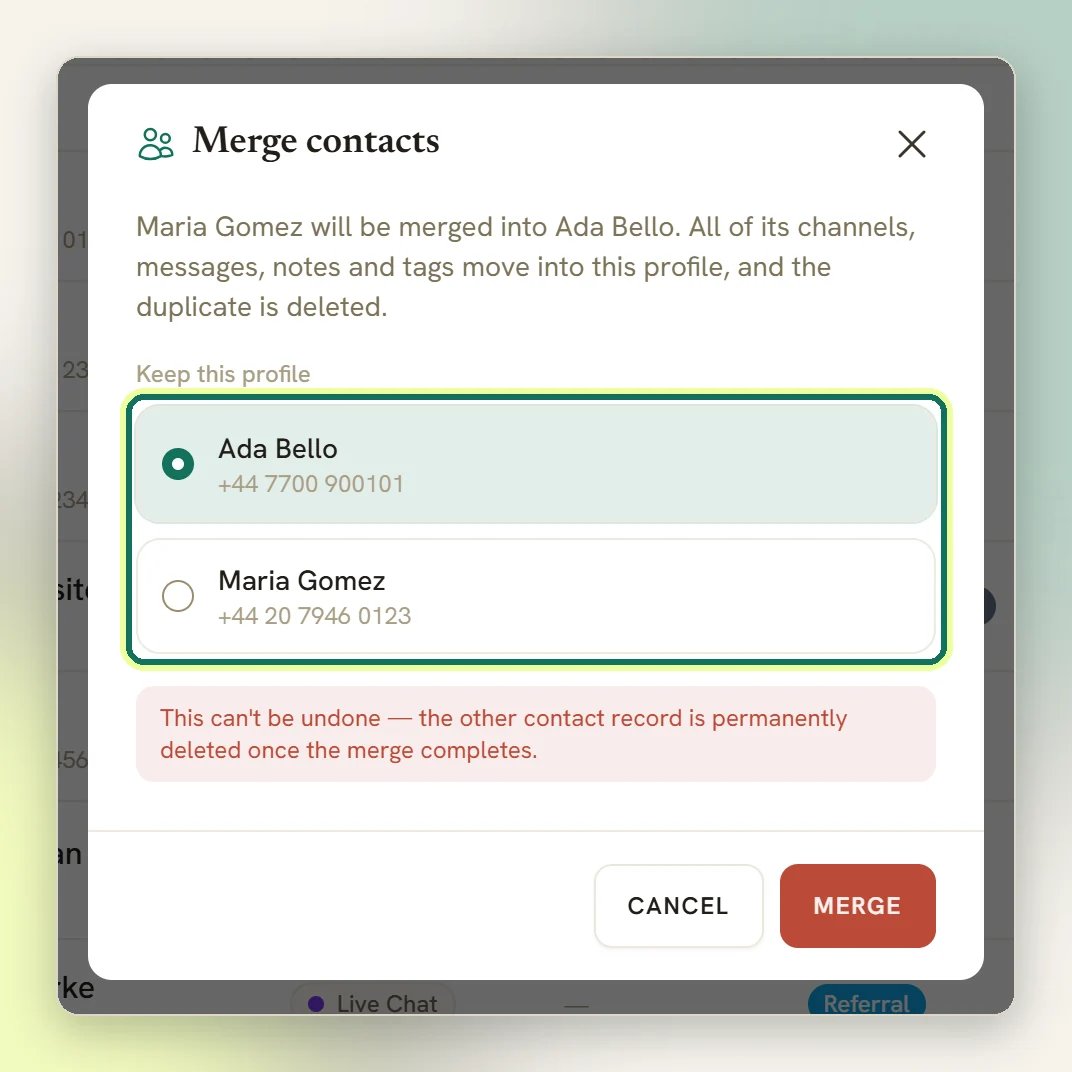
<duplicate> will be merged into <profile you keep>.
It then adds: “All of its channels, messages, notes and tags move into this profile, and the
duplicate is deleted.”3
Confirm with Merge
The list returns with Contacts merged into one profile. and the selection cleared.
- Opt-out sticks. If either profile had opted out of messages, the survivor is opted out, with the earlier of the two dates. A merge can never quietly re-subscribe someone.
- Blocked sticks. If either profile was blocked, the survivor is blocked. A merge can never quietly unblock someone, and because blocking and opting out are separate switches, the survivor can come out blocked because of the profile you did not keep.
- WhatsApp calling consent folds to the most restrictive. Per connected number, if either profile had declined calls, the survivor is left declined. A decline is never turned back into an allow.
- Client status sticks. If either profile was a client, the survivor is a client, keeping the earlier conversion date.
Lifecycle stage: leads and clients
Every contact has a lifecycle stage. It answers one question: is this person still an enquiry, or are they doing business with you?
The list at the top of Contacts filters on exactly this: All, Leads, Clients,
Archived.
Two further stages exist in the data (
archived and inactive), but no button in the
dashboard sets either one. There is no archive button on a contact, and the edit form does not
touch the lifecycle stage. Two paths outside the dashboard can: the
API, and the MCP tool
set_lifecycle_stage, which an AI client can call once you confirm it, and only if the person
who created the key holds Convert to client / mark as lead / archive. The Archived tab
is real and counts whatever those put there, so on a workspace that has used neither it reads
zero. A contact set to inactive has no tab at all and disappears from everything except
All.Clients are a filtered view, not a separate list
This is worth saying plainly because it shapes everything else: Clients is the same Contacts page with the lifecycle filter set to Client. Same records, same filters, same counts. There is no separate client database to keep in sync, and a person cannot be a contact and a client; being a client is something a contact is. What a client gets is more of the profile page: credits, amount due, loyalty points, lifetime value, and tabs for invoices, orders, payments, appointments and the rest. Leads render without any of it. See The client profile.How a lead becomes a client
Automatically, most of the time. A contact is promoted the moment real commerce touches them:- an invoice is created for them
- an order is created for them
- a payment is recorded against them
- a subscription starts
Convert <name> into a client? They'll be billable and gain access to invoices, orders and credits. with the
contact’s name filled in.
The manual button needs a way to reach the person first: “A client needs at least a phone
number or email so you can reach and invoice them. Add one to continue.” Add a phone number
or email and convert again. Automatic conversions never stop for this.
Going back
Mark as lead moves a client back, but only if there is nothing commercial on file. If they have a confirmed booking, a successful payment, or a paid order, DMLY blocks it: “This client has billing or booking records and can’t be moved back to a lead.” Downgrading never deletes anything. The client profile, the invoices and the history all stay; only the stage changes.Five things that look like the same setting and aren’t
This trips people up more than anything else in the CRM. A contact carries several independent switches, and none of them feed each other.The Archived tab is not the Inbox archive. Archiving a conversation tidies your Inbox
folder; it does not touch the contact’s lifecycle stage, and it will not put anyone in the
Archived tab.
Two things about the list itself
- The channel you are working in does not filter this list. Contacts always shows every person in the workspace. The active channel scopes your conversations, not your people. Channels is there as an optional filter if you want it.
- Someone who has only ever left a public comment is kept out of this list. If every message you hold for a person is a public comment (Facebook, Instagram or TikTok) or a Google Business review, they are left off the list and out of its numbers: All, Leads, Clients, Archived and the Pipeline board all exclude them, because there is no channel you could message them on. They still exist: their comment thread is in the Inbox under Comments, and a comment-to-DM automation can still reach them. What puts someone on the list is a DM, in either direction: the moment one passes, including one your comment-to-DM automation sends, they show up here like anyone else and stay on the list however much they comment afterwards. Most drive-by commenters stay this way, comment-only: see Automate comments and comment-to-DM for what turns a commenter into a contact. What stays separate for the people who are here is the conversation: comments are threaded apart from DMs rather than folded into one thread.
Acting on several contacts at once
Every row on the list has a checkbox, and so does the column header. Check a few rows (or check the header box to add every row on the page you’re looking at to what you have already ticked) and a bar appears near the bottom of the screen with a count and a row of actions.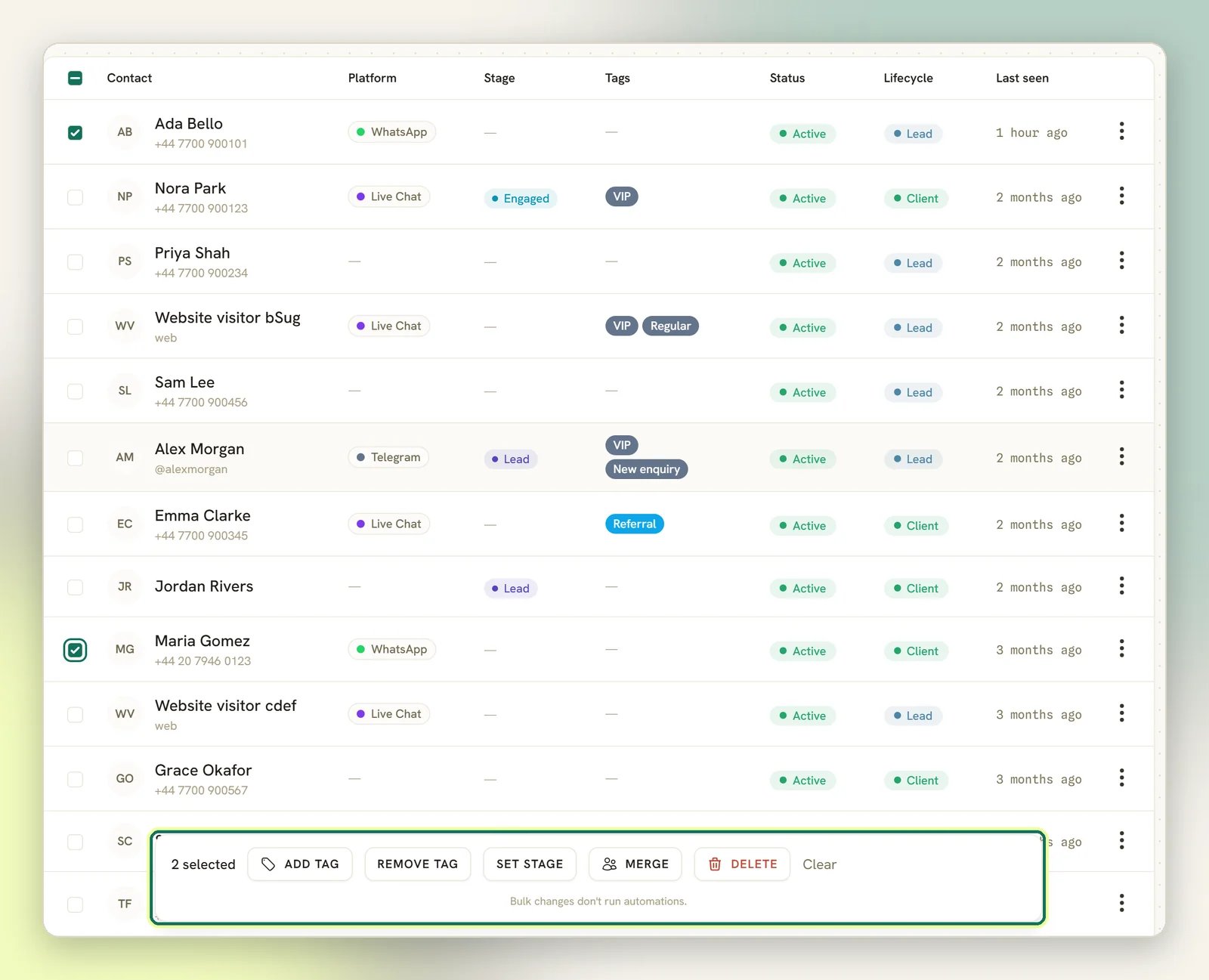
Your selection follows you across pages. The list shows 20 contacts at a time by
default, and the Per page dropdown under the list offers 20, 50 and 100. The header
checkbox adds the current page to whatever you already have ticked, and ticking it again
drops that page back out. Paging and changing the page size both keep the selection, so the
bar can read
12 selected while you’re looking at a page you haven’t ticked anything on.
Changing a filter or the search box clears it, so you can never bulk-action someone you can
no longer see.For a batch bigger than one page, tick the header checkbox: once every row on the page is
ticked and more contacts still match your filters, a Select all N matching link appears
in the bar, where N is how many contacts the current filters match. Click it and the bar
switches to All N matching selected, and the action runs against every contact those
filters match, not just the ones on screen.
Add tag, Remove tag and Set stage need permission to edit contacts; Delete and
Merge need permission to delete them, because a merge deletes the duplicate. A teammate
missing one simply doesn’t see that button. See
Roles and permissions.
Two of the five stop to confirm. Delete asks:
Delete <n> selected contacts? Their conversations, notes and documents are removed too. This cannot be undone. Merge opens the
Merge contacts modal, where you choose the profile to keep before committing. Add tag,
Remove tag and Set stage apply the moment you pick a value; there’s no confirmation step,
so check your selection before you click. Clear on the right of the bar drops the selection
without touching anything.
Despite “This cannot be undone.”, a bulk delete is recoverable for 30 days. Each contact lands in
Contacts → Recently deleted, and Restore brings them back along with the records deleted
with them. Documents and attachments are removed at the time and cannot come back. A contact with
a very long history may come back only in part, and is flagged Partial recovery. After 30
days the contact is gone for good. Recently deleted only shows for teammates with permission
to delete contacts.
A run you tick by hand can carry up to 500 contacts, and a Select all N matching run up to
25,000. Go past either cap and DMLY refuses the whole run rather than doing part of it, and a
message tells you so. Past 500 hand-ticked contacts, the shortcut is Select all N matching,
which carries the whole filtered list in one run. Past 25,000 matching, narrow the list with
search or the filters panel and run it in smaller batches.
Inside those caps, fifty contacts or fewer apply immediately and the page tells you the result:
<n> contacts updated. Automations that watch for this change were not run. for Add tag,
Remove tag and Set stage, <n> contacts deleted. for Delete. More than fifty are handed off to
run in the background instead, so you don’t have to sit and wait on a long one. The page says
<n> contacts queued — this runs in the background., and for Add tag, Remove tag and Set stage
it adds the same Automations that watch for this change were not run. None of that applies to
Merge: it is always two contacts and always runs there and then.
Bulk tag and stage changes don’t start an automation. A bulk Add tag or Remove tag
here runs with automation triggers switched off for the batch, so it never fires the
Tag applied / Tag removed trigger and a 300-contact tag can’t stampede the queue with
300 flow runs. Tagging one contact at a time still fires those triggers as normal: from
the inbox, a contact’s own tag editor, an automation’s own Tag Action step, or the AI agent.
See Triggers. What does fire every time, bulk or not, is the matching
webhook (
contact.tagged, contact.untagged or
contact.stage_changed once per contact), so an external system watching for those doesn’t
miss any.A CSV import doesn’t start automations either. The whole import runs
with automation triggers switched off, so no row fires New contact, Tag applied, Tag
removed or Field changed, however big the file. The success message says so: it ends
“Automations that watch for new contacts were not run.” The webhooks still go out
(
contact.created, contact.tagged, contact.untagged). One thing to watch: the tags column
replaces a contact’s tags rather than adding to them, so a re-import with a blank tags column
strips the lot. See Triggers.Where to go next
Tags and segments
Label people, and build the reusable audiences your broadcasts send to.
Pipeline stages
Your own sales columns, and how to rename or reorder them.
Custom fields
Store the details your business needs on every contact.
The client profile
Credits, invoices, loyalty and the manual actions on a client.
Import contacts from CSV
Bring an existing list in without creating duplicates.
Data and privacy
Opt-outs, blocking, suppressions, export and deletion.