

The AI agent is on every plan. The four AI tiles are where you connect your own AI
provider key, and that part does depend on your plan. See
AI tiles and your own provider key below.
The tabs
Tabs filter the tiles by what the tool is for. Channels is always first, then All, then a tab for each category that has at least one tile. Each tab carries a count badge, so you can see at a glance how many tiles sit behind it.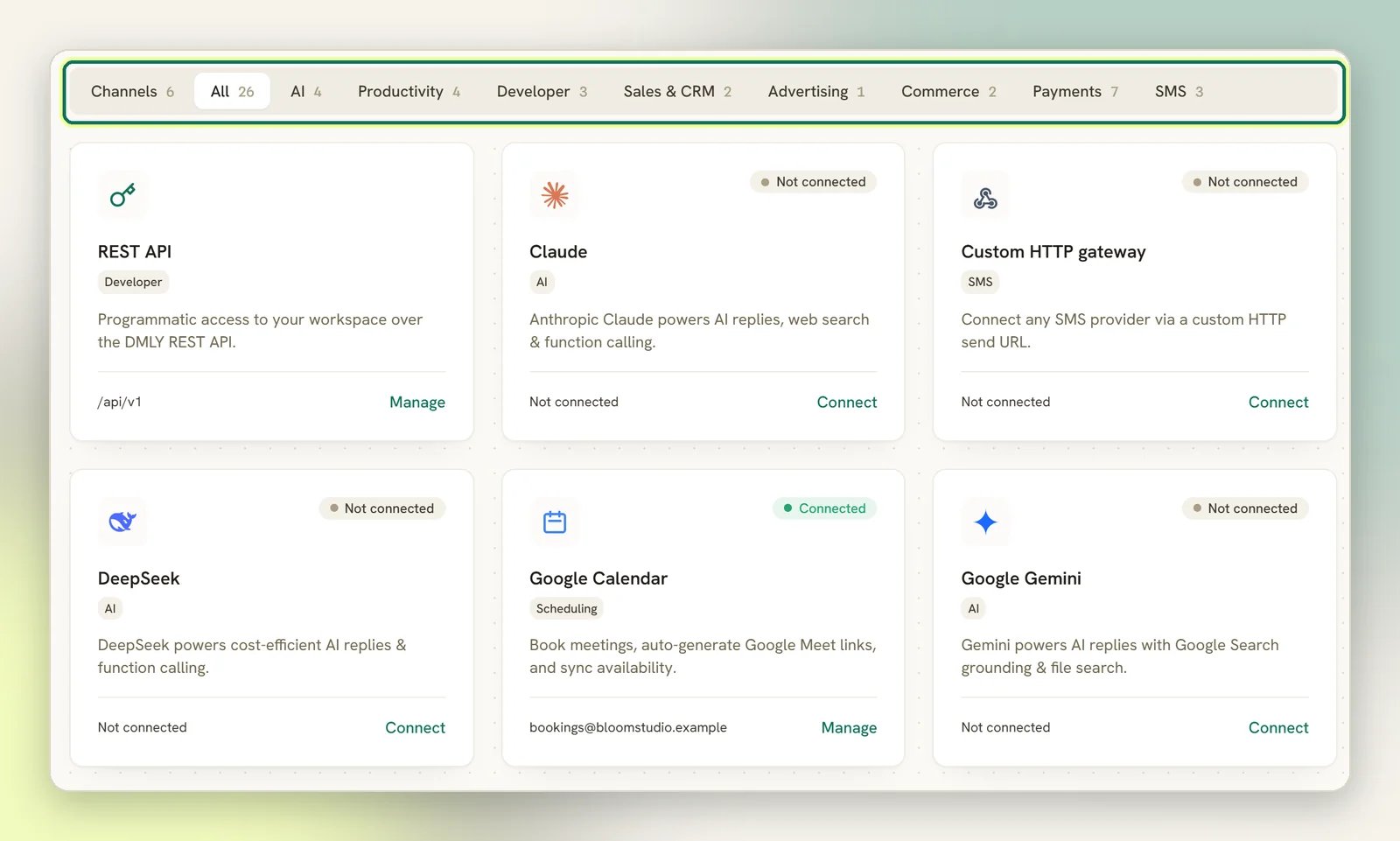
How connecting works
Every tile shows its own status, Connected or Not connected, and a matching button: Connect if you haven’t set it up, Manage if you have. A third status appears on its own. If a tool starts rejecting your credentials (a key revoked or rotated, or an expired token), DMLY flips that tile to Error and emails your workspace admins once, with the subject Action needed: your Zoom integration was disconnected (naming whichever tool it was) and a Reconnect integration button. For payment gateways, Shopify, WooCommerce and HubSpot, the email also says what stops working until it is fixed. For other tools, such as Zoom and Google Calendar, it only says the credentials were rejected and asks you to reconnect. It is one email per outage rather than one per failure, so a dead key doesn’t flood anyone’s inbox. Pasting working credentials clears the status.1
Open the tile
Select Connect on the tool you want. Each tool has its own panel, because each one
needs different details: an API key for OpenAI, a sign-in for Zoom, an access token
and webhook secret for Mercado Pago.
2
Enter the credentials
Get them from the provider’s own console, then paste them in. Secrets are stored
encrypted, and a saved credential like an AI provider’s API key or a payment gateway
secret is never shown back to you; the panel only signals that a value is saved.
Some secrets are meant to be read, though: a webhook’s signing secret and the Zapier
API key each sit behind a Reveal toggle with a Copy button next to it.
3
Check the status
A saved connection flips the tile to Connected. From then on, the button reads
Manage and takes you back to the same panel to change or disconnect.
Webhooks are the only tile you can delete rows from. Every other tool is disconnected,
not removed; the tile stays on the page so you can reconnect later.
AI tiles and your own provider key
The AI agent itself is on every plan. You never have to upgrade to put an AI step in a flow, or to let the chatbot reply. What depends on your plan is whether you may connect your own provider key. The four AI tiles (OpenAI, Claude, Google Gemini and DeepSeek) are where you do that, and they stay visible either way.- If your plan allows your own keys, the tile behaves like any other: Connect, paste the key, Connected. From then on your chatbot runs on your own provider account, on the model you choose, and those replies are unlimited on DMLY’s side because you are paying the provider directly.
- If it doesn’t, the tile stays on the AI tab with a Plan locked badge instead of Not connected, and the action reads System AI. Selecting it doesn’t open the panel; it shows This plan uses the built-in system AI. Upgrade to connect your own AI provider keys. Your chatbot still works. It replies on DMLY’s shared system AI, and each reply counts against your monthly AI replies allowance.
What’s on the page
AI providers
Connect OpenAI, Claude, Gemini or DeepSeek so your flows can reply with AI.
Connect Claude
The other direction: let Claude work inside your workspace and answer questions about it.
Knowledge base
Upload documents the AI can search when it replies. OpenAI and Gemini only.
Zoom
Give every booking on a Zoom-location service its own meeting and join link.
Mercado Pago
Take Latin-American payments with Checkout Pro.
Payment gateways
Stripe, PayPal, Paystack, Razorpay, MyFatoorah and Monnify for pay links and invoices.
REST API
Programmatic access to your workspace. Always available on All and Developer.
Looking for Google Drive? It isn’t an Integrations tile. It’s a tab in the media
library, where you pick images and videos straight from Drive. See
Google Drive.
If the tool you need isn’t here
Select Request integration at the top right of the page, name the tool, and add a note about how you’d use it. The request goes to the DMLY team, not to your agency.The page looks empty or a tile is missing
The page looks empty or a tile is missing
The tile catalogue is created for your workspace the first time you open the page, so a
brand-new workspace fills itself in on the first load. Refresh once before assuming
something is broken.A tile that used to be there and now isn’t has usually moved rather than gone. Google
Business Profile, for example, is no longer an integration; it’s a channel now. See
Reputation.