

Which gateway a link is minted on is set under Finance → Settings → Gateways, in the
Default payment gateway card: Charge through lists your connected gateways, with
First connected gateway as the fallback. The same choice covers invoice pay links, booking
payments and the payment steps in a flow, so they all land in the same account.A subscription’s card-capture link is the exception. It uses the gateway the subscription
already charges through. Failing that, it uses the first connected gateway in alphabetical
order, not your Charge through choice. With two gateways connected, a card can be saved on
a different processor from the one you picked.Leave it on First connected gateway and the earliest still-connected gateway wins, whichever
brand it happens to be, which has two consequences worth planning around. If you connect a
second gateway expecting new links to use it, they will not until you choose it here. And if the
gateway you chose is later disconnected, the next-earliest connected gateway silently takes over
rather than the link failing.
Gateways you can connect
Seven gateways are built. Anything else is not supported.
There is no “sign in with Stripe” button. Connecting is always copying API credentials out of the
provider’s dashboard and pasting them into DMLY. The credentials you paste are checked when you
connect, so a typo fails at that point rather than at the first real payment.
Connect a gateway
1
Get your credentials from the provider
Sign in to the provider’s own dashboard and copy the fields listed above for your gateway.
Use live credentials for real money and the provider’s test credentials while you are trying
things out.
2
Paste them into DMLY
Go to Configurations → Integrations and open your gateway’s tile: it holds the credential
fields. Paste each credential into its field and save. DMLY validates them on save.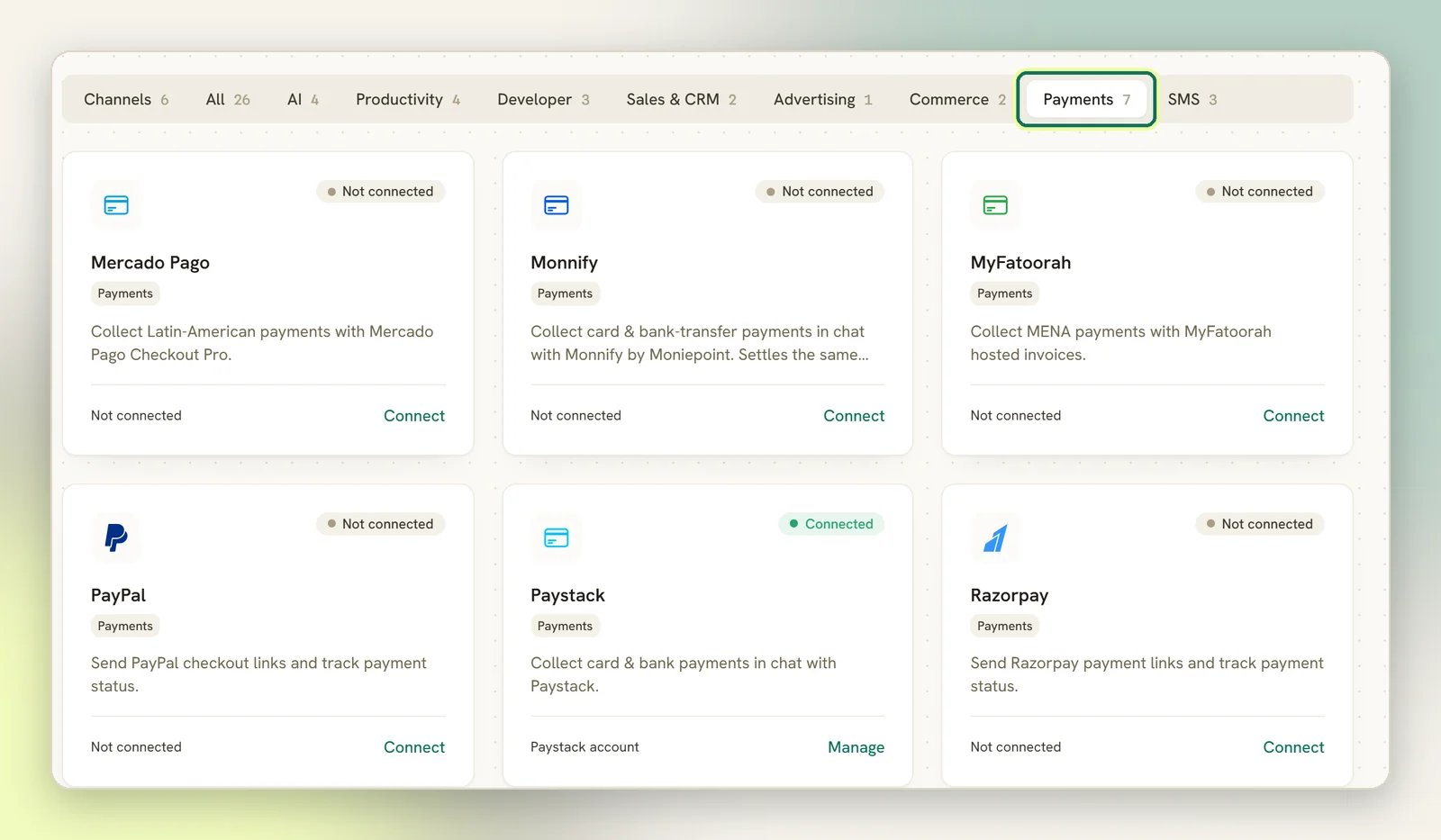
3
Add the webhook endpoint in the provider's dashboard
This step is not optional and DMLY cannot do it for you. The gateway’s tile displays the webhook
URL to paste into the provider; connecting a gateway prompts you to set that URL in the
provider’s own dashboard. Add it there and paste the resulting signing secret back into DMLY
(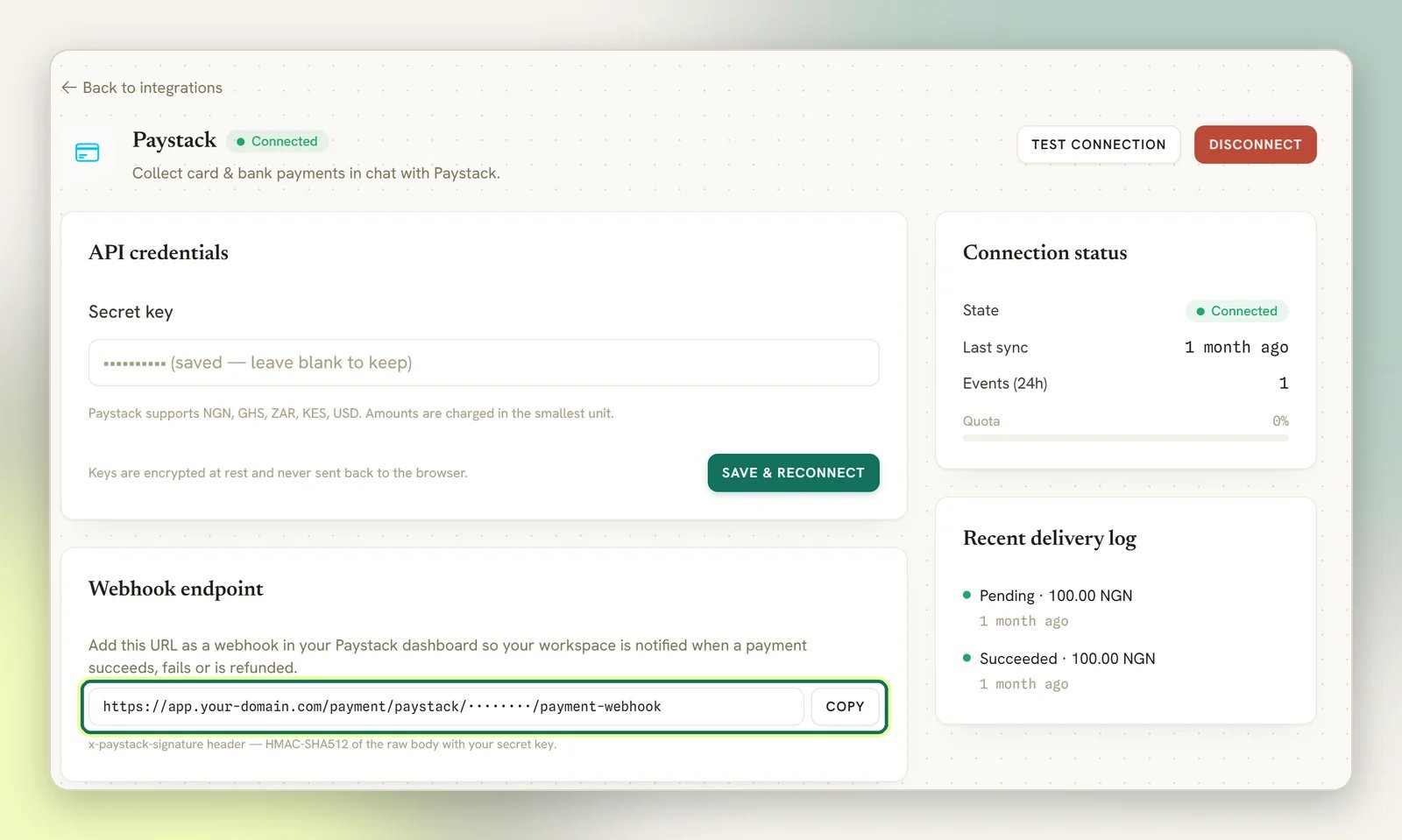
webhook_secret, or webhook_id for PayPal). Paystack and Monnify are the exceptions: they
have no webhook secret field, because your secret key signs their webhooks. In Monnify, set the
URL under Developers → Webhook URLs.4
Take one real payment end to end
Send yourself a small invoice, pay it, and check the invoice flips to Paid on its own. If it
doesn’t, the webhook is not reaching DMLY. Fix that now, not after a client pays.
Take a payment
Most payments are collected against an invoice, and a Subscription always bills through one. But a booking is charged directly against the booking, with no invoice behind it, and Request payment (in the inbox, as a flow node, or as a quick automation action) mints a link for any amount with no invoice either, as does Send payment link in amount mode. Those payments still land in the same ledger. An Order gets an invoice only when you use its Generate invoice action. The steps below are the invoice route.1
Send the invoice
Sending an invoice moves it from Draft to Sent and messages the client. It goes out on
WhatsApp by default, using your approved
dmly_invoice_sent template. See
Invoices.2
Share the pay link
On the invoice, Payment link & QR gives you the link. Share link offers Share via
→ WhatsApp, SMS or Email, plus Copy link and a QR code you can show on a phone
or print. The QR is just the pay link in visual form.
3
Let the client pay
The link opens the gateway’s own hosted checkout page. On Paystack, a link minted with
Payment method → Bank transfer only opens on a one-time bank account instead of the card
form; see Collect bank transfers in chat. Either way, when the
payment succeeds, the provider calls DMLY’s webhook, DMLY records the payment against the
invoice and recalculates Balance due. You don’t mark it paid yourself.
4
The client lands back in the chat
Once they’ve paid, the checkout returns the client to a short DMLY page that thanks them and
takes them straight back to the conversation the link was sent in — WhatsApp, Messenger,
Instagram or Telegram — with a Back to… button in case their phone doesn’t follow
automatically. A booking payment also shows View your booking, and a booking paid on your
public booking page returns to that booking instead, as it always has. From live chat or SMS,
where there’s no app to return to, the page simply says it can be closed. The checkout usually
sends the client back a moment before its confirmation reaches DMLY, so the page says the
payment is being confirmed and that the receipt will arrive in the chat; it never tells them
nothing happened.
The pay link won't generate
The pay link won't generate
A pay link needs an invoice that can actually be paid. You’ll get an error instead of a link when
the invoice is Void, when the invoice has no contact attached, or when the balance is already
zero.
Payments you took yourself
Cash, a bank transfer, a card machine: record these on the invoice and they land in the same ledger as gateway payments, marked as Succeeded immediately. The methods are Cash, Bank transfer, Credit / debit card, Cheque, EFTPOS and Other. You can also record a payment from a client’s profile, see Client profile.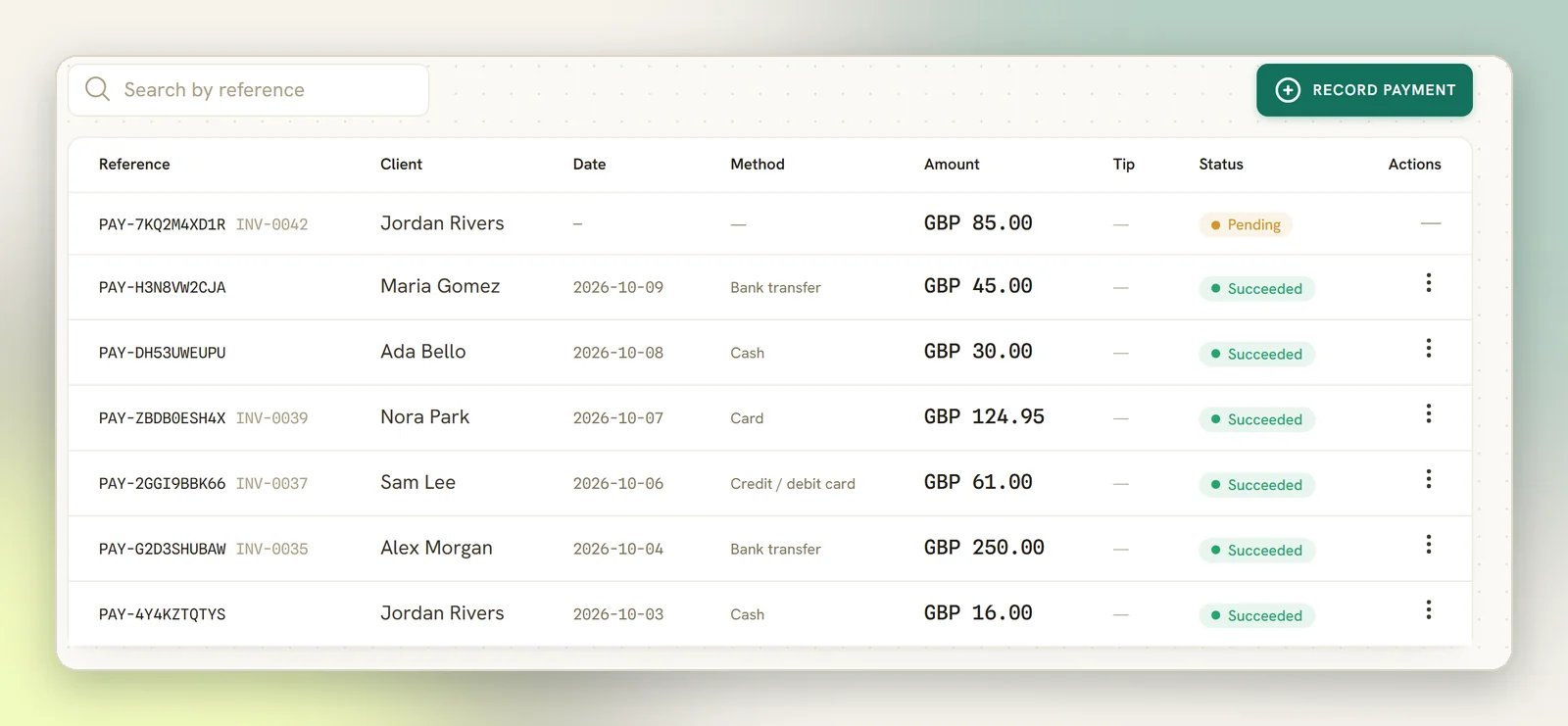
Collect a tip at checkout
Turn this on under Finance → Settings → Invoice. The toggle is Collect tips at checkout. Two more controls appear once it’s on:- Tip presets (%): a comma-separated list of percentages, e.g.
10, 15, 20. DMLY cleans up whatever you type: only whole numbers from 1 to 100 survive, duplicates are dropped, and the list is sorted low to high. Enter at most 6 presets: a seventh makes the whole Invoice settings save fail, with no message on screen. Clear the field entirely and DMLY falls back to10, 15, 20. - Allow a custom tip amount: on by default. Turn it off and the client can only pick a preset or no tip, with no free-text field.
What the client sees
With tips on, an invoice’s pay link and a booking’s payment link no longer send the client straight to the gateway’s own hosted checkout; they land on a DMLY-hosted page first (still carrying your workspace name and logo), because a gateway checkout has no tip step of its own. That page shows the amount due, a No tip button plus one button per preset (each showing the percentage and the resulting amount), a custom-amount field if you allowed one, and a running total. Continue to secure payment then mints the real gateway checkout for the base amount plus whatever tip was chosen and sends the client there. A tip can never exceed the amount it’s added to (it’s a gratuity, not a surcharge), and that’s enforced on submit, not just in the interface.Tipping only applies to an invoice pay link or a booking payment. Request
payment, Send payment link in amount mode, an Order’s payment, and a subscription’s
card-capture link all mint a plain gateway link with no tip step, even on a workspace with
tips turned on: none of them has an invoice or booking for the tip to attach to. A
subscription’s automatic renewal charge doesn’t mint a link at all (it charges the saved
card directly), so there’s no page for a tip step to appear on.
How a tip is tracked afterward
A tip is never folded into the charge it rides on. DMLY keeps it as a figure of its own everywhere that matters:- The invoice’s Paid / Partially paid status, and its paid and due amounts, are worked out from the base charge alone. A tip never marks more of the invoice as settled than what was actually billed.
- The client’s statement is credited for the base amount only; a tip leaves no mark on their running balance.
- On Finance → Payments, the Amount column is the full amount charged (base plus tip), and a separate Tip column shows the gratuity on its own, blank when there wasn’t one. The two are never merged into one figure there.
- Refunding a tipped payment at the gateway reverses the whole charge, tip included, and DMLY’s ledger stays symmetric: the client’s balance nets back to zero rather than being left owing the tip back, and their lifetime value on Client profile is never dragged negative by refunding money that was never counted as revenue to begin with.
A pay link skips the tip page even though tips are turned on
A pay link skips the tip page even though tips are turned on
Only an invoice’s pay link and a booking’s payment link ever front the tip page. That includes
an invoice generated from a Finance order. Everything else mints a plain gateway link directly
whether tips are on or off: Request payment, Send payment link in amount mode, a store
order’s payment link, and a subscription’s card-capture link. A gift-card purchase invoice also opts out on its own; you don’t tip on buying a gift
card. If a client says they never saw a chance to tip, check which of these routes minted
their link.
Payment statuses
Statuses only move forward: Pending → Failed → Succeeded → Refunded. A late or out-of-order message
from the provider can’t drag a paid invoice back to pending.
The Refund button refunds through the gateway. After its confirmation (This will refund the
payment. Are you sure you want to continue?), DMLY asks the provider to return the money first,
and only then marks the payment refunded and reverses it on the client’s statement. If the gateway
can’t refund that payment, or refuses, nothing is recorded and DMLY tells you to refund it in the
provider’s own dashboard instead. The reverse direction works too: a refund you issue at the
provider arrives as a webhook and flips the payment to Refunded in DMLY.
Refunding needs the Issue refunds permission, which is admin-only out of the box. A teammate
without it never sees the Refund item in the payment’s menu, and the action is refused on the
server as well, so it cannot be reached by other means. Grant it per role on
Workspace Settings → Team Members. See
Roles and permissions.
Sandbox behaviour
When the install runs in sandbox, no gateway is ever contacted. Pay links are fake, predictable URLs shaped likehttps://pay.demo/<provider>/<reference>, and a charge always succeeds. This lets
you walk the whole flow (invoice, link, payment, receipt, statement) without a provider account
or real money.
Sandbox only skips webhook signature checks on a local or test install. On a live install, an
incoming webhook must carry a valid signature no matter what, so nobody can post a fake “paid”
message to your workspace.
What a failed webhook means
The webhook is how the gateway tells DMLY that money moved. Everything downstream (the invoice going Paid, a held appointment slot being confirmed, a receipt) hangs off it. So a webhook problem doesn’t lose the client’s money, it loses DMLY’s knowledge of it. The webhook never arrives (endpoint not added in the provider’s dashboard, or the wrong URL). The client is charged, the provider shows the payment, DMLY shows the invoice still unpaid. Nothing retries, because nothing arrived. Fix the endpoint in the provider’s dashboard; new payments will then reconcile on their own. The webhook is rejected (wrongwebhook_secret / webhook_id, or copied from a different
environment). Same visible symptom: paid at the provider, unpaid in DMLY. Re-copy the signing
secret from the provider into DMLY.
The webhook arrives but errors. DMLY retries it. A payment message that fails mid-processing is
not treated as already-handled on the retry, so it isn’t silently dropped.
The payment doesn’t match anything DMLY expected (for example a charge started outside DMLY).
It is still recorded as a payment rather than discarded, so the money is visible even if it isn’t
attached to an invoice.
The credentials stopped working. If the gateway rejects your key (revoked, rotated, or an
expired token), DMLY flips the integration to Error and emails workspace admins once, with the
subject Action needed: your Stripe integration was disconnected (or whichever gateway it was), a
line naming what stops
working until it is fixed, and a Reconnect integration button. One email per outage rather than
one per failure, so a dead key does not flood your inbox. Paste fresh credentials to clear it.
An appointment was paid for but isn't confirmed
An appointment was paid for but isn't confirmed
For a booking that requires payment first, the slot is held and only confirmed when the payment
succeeds, which DMLY learns from the webhook. If the webhook doesn’t arrive, the hold lapses and
the slot frees up even though the client paid. If a payment for a lapsed hold does arrive, it’s
flagged rather than thrown away. See Appointment payments.
Saved cards and automatic renewals
Subscriptions can charge a saved card automatically on Stripe, PayPal, Paystack, Razorpay and MyFatoorah. Mercado Pago and Monnify cannot. The card is captured through a separate setup link, and no payment is recorded against the subscription at that point. If a renewal charge fails, DMLY retries every 2 days and pauses the subscription after 3 failures, notifying the client each time. See Subscriptions. Stripe, PayPal and Razorpay capture the card without charging it. Paystack and MyFatoorah tokenise the card with a small real charge on the hosted page, so on those two the client does see a charge.Related
Invoices
Create, send, part-pay and void an invoice.
Finance settings
Default currency, due days and numbering.
Subscriptions
Recurring billing and automatic renewals.
Appointment payments
Charge before or after a booking.
Collect bank transfers in chat
Paystack Pay with Transfer, or your own account details with an I’ve paid button.