

Prices and allowances live on dmly.io/pricing, which is the source
of truth; the figures here can drift. If you bought DMLY through an agency, ignore this
page: your agency sets its own plans and prices. Your workspace’s real allowances are always
in Workspace Settings → Billing. See How plans work.
The three plans
Starter
For solo owners getting started on WhatsApp. One number, a couple of people, a few
thousand active contacts.$39/mo billed monthly, or $29/mo billed yearly.
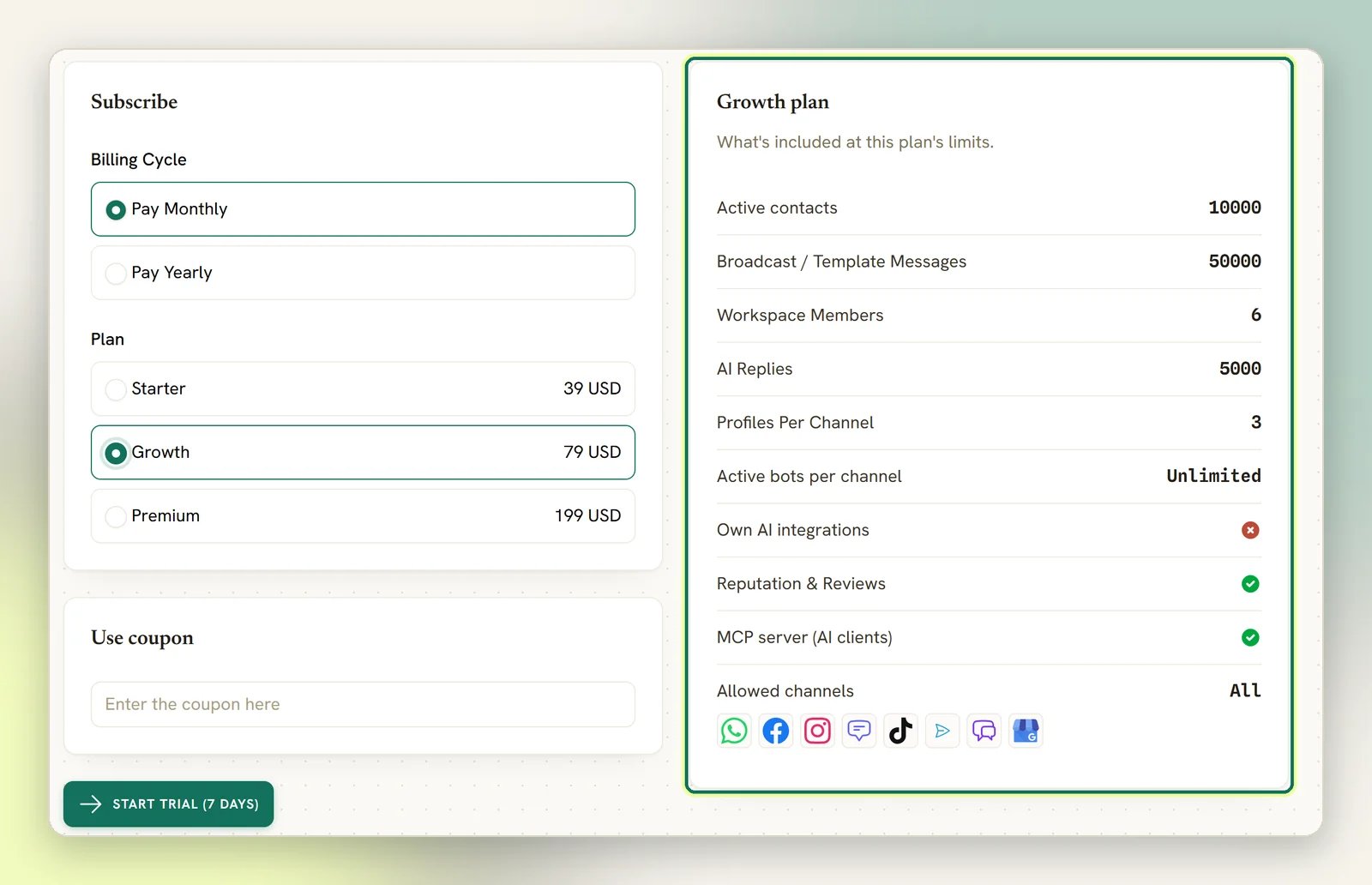
Growth
For growing local businesses on every channel. Most popular: the same toolkit as
Starter, with room for more numbers, more seats and a much bigger audience.$79/mo billed monthly, or $65/mo billed yearly.
Premium
For established and multi-location businesses. Unlimited active contacts, more numbers,
more seats, onboarding.$199/mo billed monthly, or $149/mo billed yearly.
What actually differs
AI replies are the one allowance worth reading twice. Every plan includes a monthly
allowance of chatbot replies generated on DMLY’s shared AI, and that is where the tiers
genuinely separate: 500 a month on Starter, ten times that on Growth, forty times on Premium.
Connecting your own OpenAI, Claude, Gemini or DeepSeek key is the way past the allowance
entirely, because replies on your own key are unlimited and never counted. That is a
Premium capability; on Starter and Growth you use the shared AI and its allowance. You are
billed by your own provider for anything on your own key.
Your own figures are in Workspace Settings → Billing → Change subscription plan, and what
you have used is on Billing → Usage. See How plans work.
How to pick
1
Start from what you use, not what you need
There is no feature cliff between the plans. Reputation (Google
reviews, replies and review requests), a
custom domain for your booking page, the
AI agent, the API and everything else are on Starter as well
as the tiers above it.So no feature can decide this for you. Work through the numbers below instead: profiles,
seats, contacts and broadcast volume. Whichever of those you cross first is your plan.One exception: Meta Ads, connecting your Meta ad account. You need it for ad spend in
the ads report and for paid Marketing Messages on Facebook Messenger, and it is off unless a
plan explicitly includes it. The Change subscription plan panel does not list it, so you
can’t check it there. The only place it shows is the Meta Ads tile under
Integrations, which reads Plan locked with Upgrade when your plan lacks it. If you
plan to use either, ask whoever sells you DMLY before you choose. See
What a plan governs.
2
AI is on every plan: what scales is the allowance
Every plan can use the AI agent: the AI node in automations, connecting an AI provider, and
AI-suggested inbox replies. What differs is billing, not access:
- AI replies is a monthly allowance of chatbot replies generated on DMLY’s shared AI: 500 on Starter, 5,000 on Growth, 20,000 on Premium. It resets at the start of each calendar month.
- Own AI integrations is connecting your own OpenAI, Claude, Gemini or DeepSeek key instead, which makes replies unlimited and stops them drawing on the allowance at all. That one is Premium. You pay your own provider directly for what you use.
3
Count your numbers, not your ambitions
Profiles per channel is the one that catches people out. It’s how many accounts you can
connect of each type: one WhatsApp number on Starter, three on Growth, five on Premium. A
second shop with its own WhatsApp number needs a second profile. This is the cap that
refuses the connect, so it’s the one to count against, though a
Extra profile per channel add-on raises it without changing plan.Team seats is how many staff you have, not how many customers. It counts everyone who
logs in, pending invitations, and active bookable staff who have no login of their own. So a
salon that adds its stylists as bookable staff uses a seat for each one. Once the seats are
full, both inviting a teammate and adding such a staff member are refused.
4
Size your list honestly
Active contacts is your audience, and it isn’t your whole contact list. It only counts
contacts your business has actually messaged with or heard from in the last 30 days, a
rolling window that clears out as conversations go quiet. Reaching it never blocks a new
contact, an import or an inbound reply. Instead the Contacts page
shows a usage gauge that turns amber at 90% of your cap and red at 100%, so it’s harder to
miss the closer you get. You also get an in-app alert at 90% and again at 100%; see
Inbox notifications. Three thousand goes further than it sounds for
a single-location business, and further still if you’re mostly doing inbound conversations
rather than broadcasting.Broadcast / template messages is the allowance for messages you start: campaigns and
notifications. Replying to someone who messaged you is a conversation, not a broadcast.
5
Top up before you jump
If one number, one seat or your contact list is the only thing over the line, an
add-on is cheaper than a tier: an extra seat is $10/mo, an extra
number or profile $15/mo, and extra contacts are $15 per 1,000. Add-ons are billed
monthly, even when your plan is billed yearly.A second WhatsApp number on Starter costs $15/mo as an add-on. Jumping to Growth for it
costs $40/mo more (billed monthly): the whole tier, for one number. Only jump when you
are pushing against several limits at once.
Rough shapes
Solo: one number, script-based bot
A salon owner on one WhatsApp number, a partner who also replies, a couple of thousand
regulars, a booking bot that follows a script. Starter: three seats covers the owner,
a partner and one more.
Growing: several channels, AI, reviews
A clinic taking enquiries on WhatsApp and Instagram, using the AI agent to handle the
repetitive half and chasing Google reviews afterwards. Growth: the AI volume is the
reason. Every feature here is on Starter as well, but 500 AI replies a month goes quickly
on a busy inbox, and Growth is ten times that.
Multi-location
Three branches, a number each, a manager per branch plus front desk, a list well past
ten thousand. Premium: the profiles and seats are what you’re buying.
Reselling DMLY
Running DMLY under your own brand for your own clients is not one of these tiers; it’s
Whitelabel & Enterprise, with volume pricing, SSO and a partner manager.
See Agency overview.
What your subscription does not cover
Your plan’s broadcast / template messages allowance and Meta’s conversation charges are two separate ceilings. You can be well inside your DMLY allowance and still run up a Meta bill. See WhatsApp rules and limits.Try before you decide
Every plan has a 7-day free trial, no credit card. You only pay when you’re ready to go live. The trial is the honest way to answer the profiles-and-seats question: connect your real number, invite your real team, import your real list, and see which ceiling you touch first. Start on the plan you think you need; you can change it from settings at any time, and your data, flows and history carry over either way. See Upgrading and downgrading. DMLY flags a limit before you hit it rather than after, so you get a chance to top up or move up before anything stops.How plans work
Where to see your own allowances, and what happens at a limit.
Add-ons
Top up seats, numbers or contacts without changing tier.