

Which channels it works on
Growth tools produce a working link on WhatsApp, Facebook, Instagram and Telegram only. Those are the four platforms with a chat address DMLY can send someone to. DMLY actively blocks the page on SMS, TikTok and Live Chat. Growth Tools stays in the sidebar under Messaging on every channel, but selecting it while one of those three is active doesn’t open it. You get a message instead:Growth tools need a channel reachable by a chat link — not available on SMS, TikTok or Live Chat.That message carries a Switch profile button, which moves you to a channel that does support them and lands you on the page. The reason is not a missing feature: a growth tool is a link that opens a chat app, and those three channels have no chat app to open. There is no setting that turns them on.
You need at least one channel connected. With none, the page shows a prompt to connect a
channel rather than your tools. Start at Channels if you’re not
connected yet.
What a growth tool produces
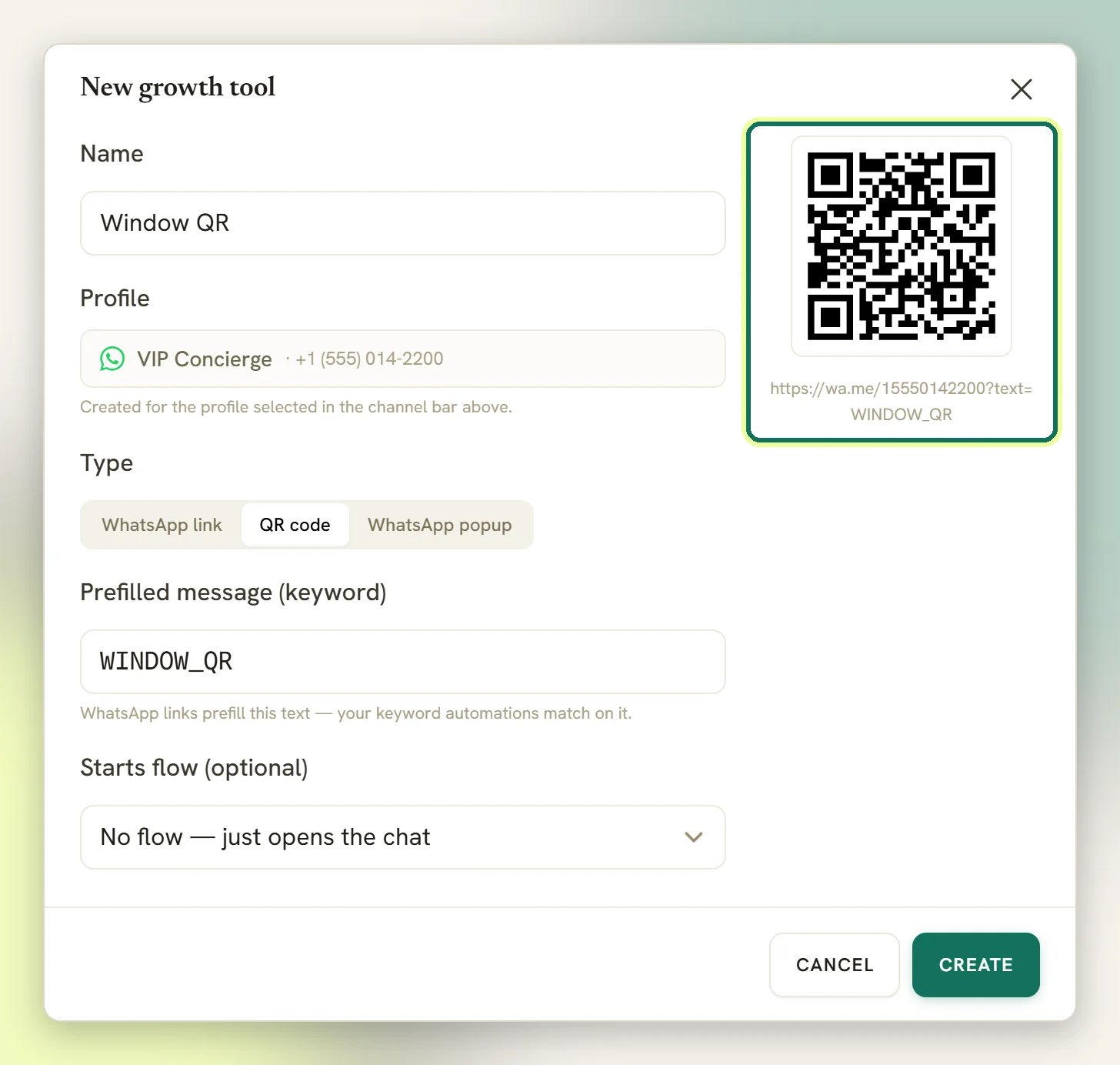
You give a tool a name and pick its type: Ref link or QR code (on a WhatsApp channel the first is labelled WhatsApp link, and there is a third type, WhatsApp popup, covered in QR codes and links). These are alternatives, not a pair. A ref link gives you a Copy link button and nothing to print. A QR code gives you a scannable image to Download QR. Pick by where it’s going: a bio, a button or an ad wants a link; a window, a menu, a receipt or a table tent wants a QR code. Either way the destination is the same. What you copy, and what the QR encodes, is a short tracking link on your DMLY address. Someone taps or scans it, DMLY records the click, then forwards them straight on to the chat:wa.me for WhatsApp, m.me for Facebook, ig.me for
Instagram, t.me for Telegram. That hop is what makes the counting possible.
Review QR codes live on the Reputation page, not here. Generating a review QR under
Reputation → Request reviews creates a growth tool on your Google Business profile so its
scans can be counted. It never appears on the Growth Tools page, can’t be deleted from it,
and isn’t counted in the Growth clicks tile. Manage it on the Reputation page.
See Ask for Google reviews.
What gets tracked
Two things, and it’s worth being clear on which is which. Clicks and scans. Each tool counts how many times its link was opened, labelled clicks on a ref link and scans on a QR code. New tools start at zero. This counts the tap, not the person: someone who opens the link and never sends a message still counts. Contacts. When someone messages you from a growth tool, DMLY can stamp that tool’s name onto the Contact as their source. That’s the signal that matters: the poster that produced a real conversation, not just a curious tap. Two things to know about the stamp: it only fills a source that’s still empty or still just the channel’s own name, so anything you or your team typed in by hand survives untouched; and on WhatsApp it applies to brand-new contacts only, so someone already in your list who taps a poster keeps the source they had. The per-tool number lives on the Growth Tools list itself: every tool carries its own running total next to it. Overview carries a Growth clicks tile, which is the total for the channel you have selected. The Growth-tool attribution panel breaks that down per tool: Tool, Clicks, Contacts and Conv %, for your top 6 tools by clicks. To see which tool one person came from, open the Contact and read the source. The count is raw. Every visit to the tracked link counts, including link previews that apps like WhatsApp or iMessage fetch, and repeat taps from the same phone.Tools belong to a profile
A growth tool is created for the channel selected in the channel bar, and belongs to it permanently. There’s no channel picker when you create one, and the list only ever shows tools for the channel you currently have selected.If a growth tool seems to have disappeared, check the channel selector before you rebuild it.
It’s almost always on another profile. A WhatsApp poster and an Instagram bio link are two
separate tools, even if they do the same job, which is what you want, because then the
numbers tell you which one people actually use.
Starting a flow
A growth tool can just open the chat and leave the rest to you. It can also start an automation the moment the person arrives: a greeting, a menu, a booking, a question that qualifies them while they’re still interested. Two ways to connect the two, and you only need one:- From the tool. Point it at a flow with Starts flow (optional) when you create it. This works on every channel growth tools support.
- From the flow. The User clicks a link trigger in the flow builder starts a flow on link arrivals. This one is WhatsApp only; it isn’t offered when you’re building a Facebook, Instagram or Telegram flow, where the tool’s own Starts flow field is the only route. It can watch A specific link or Any of my links, meaning any link on that same WhatsApp profile. So one welcome flow covers every poster and QR code on that profile, without editing it each time you make a new one.
Next
QR codes and links
Create a tool, copy its link, download the QR, and read the counts. Start here.
Triggers
The User clicks a link trigger, and everything else that can start a flow.
Contacts
Where the source lands, and how to segment on where people came from.
Analytics
The Growth clicks tile in context, alongside your other channel numbers.