

What DMLY actually measures
A broadcast only ever counts Delivered and Opened on WhatsApp and SMS, and SMS
reports Delivered but not Opened. Telegram sends no delivery confirmations at all.
Facebook and Instagram do send them, and DMLY records them against the individual message in
the Inbox, but it doesn’t add them up onto the broadcast, so Delivered
and Opened stay at 0 on Meta channels no matter how well the broadcast performed. A paid
Marketing Messages broadcast is no different here, but Meta reports its campaign totals in a
separate panel: see Paid campaign results.
- Replies counts contacts who sent you a message (not a comment) within 24 hours of receiving the broadcast. It works on every channel. If a contact got more than one broadcast, the reply counts toward the latest one only, and several messages in a row count once. It appears as a stat card on the list and on the broadcast, and as the last step of the funnel.
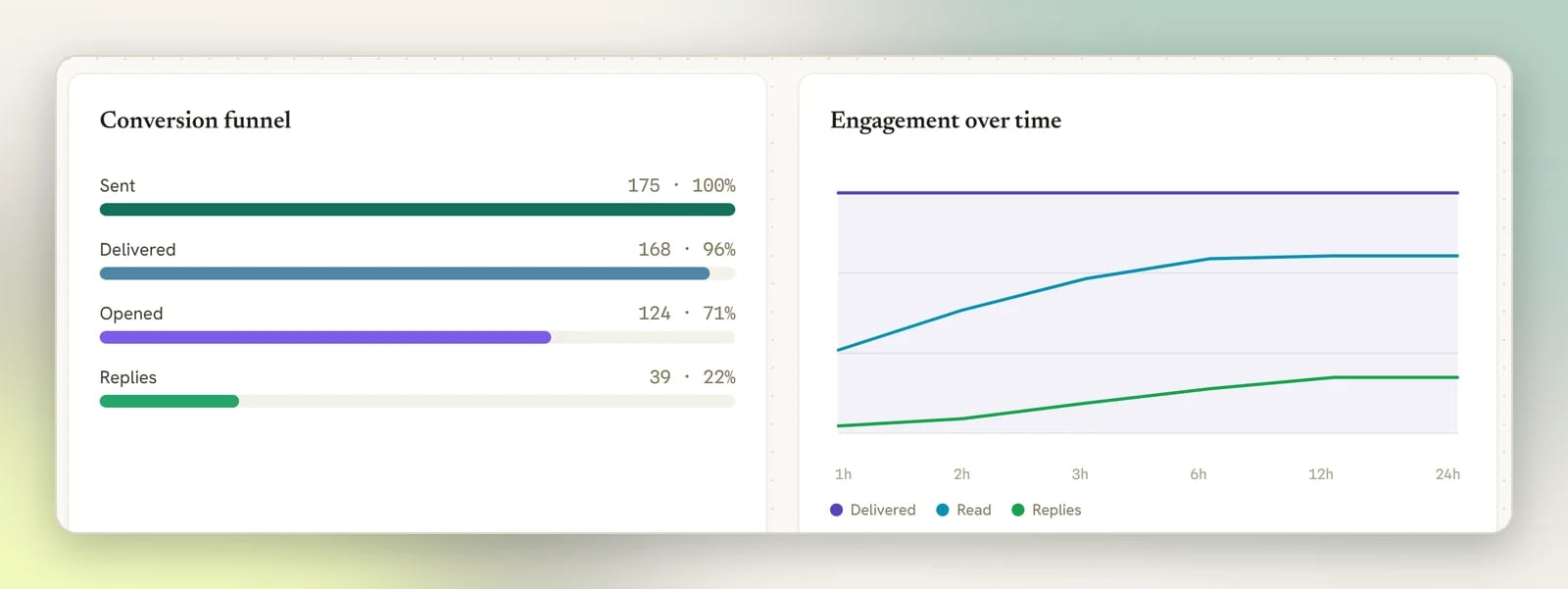
- Engagement over time plots running totals of Delivered, Read and Replies at 1, 2, 3, 6, 12 and 24 hours after the broadcast started sending. Delivered and Read only move where the channel reports them (WhatsApp, plus SMS for Delivered). Replies moves on every channel. Broadcasts sent before this chart was measured read zero.
Where to find the numbers
1
Open Broadcasts
Go to Broadcasts. The four cards at the top (Sent, Delivered, Replies and
Failed) are totals across every broadcast on the channel you’re currently working in.
Switch channel and the totals change with it.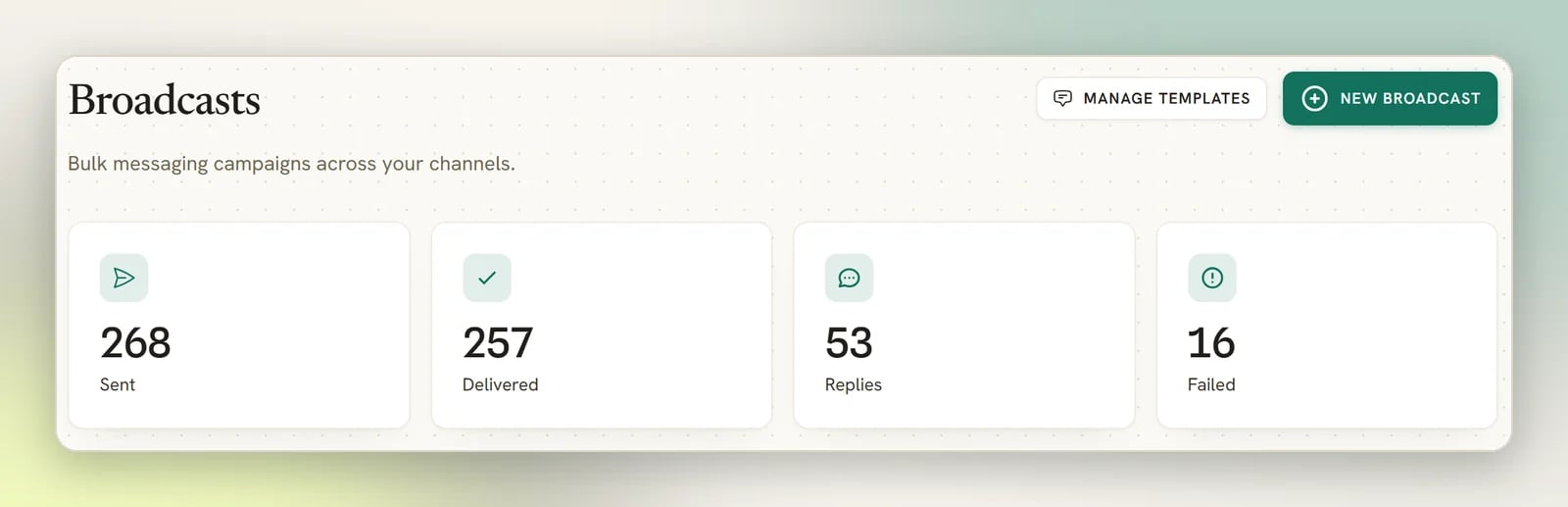
2
Open one broadcast
Select View analytics on any broadcast to see its own Sent, Delivered,
Opened, Replies and Failed, plus the Conversion funnel.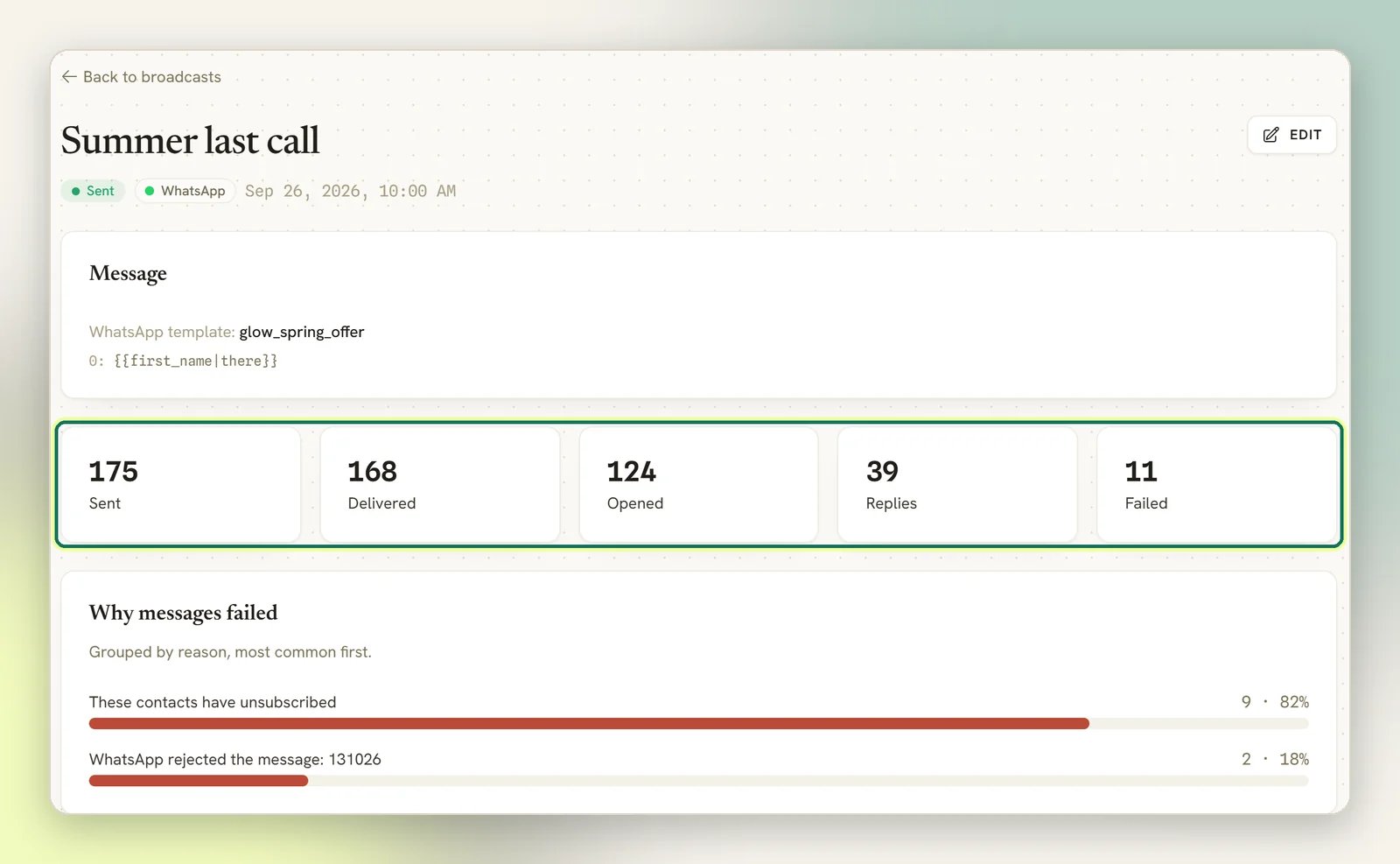
What each number means
Sent means accepted by WhatsApp, Meta, your SMS gateway or Telegram, not that it arrived.
That is what Delivered is for, which is why a WhatsApp broadcast is the only kind where you
can tell the difference.
The Conversion funnel is these same numbers as a percentage of Sent. On Facebook,
Instagram and Telegram the Delivered and Opened bars stay empty, for the reasons
above rather than because of anything you did. The Replies bar still fills.
A broadcast that reads Sent with 0 recipients isn’t broken; its audience matched nobody.
Check the segment under Audiences.
Messenger delivery (Facebook and Instagram)
Facebook and Instagram broadcasts get one extra panel, Messenger delivery, and it is real. It splits recipients by how Meta let the message through: those reached inside Meta’s 24-hour messaging window, those reached because the contact had opted in to notifications, and those skipped because neither applied. This is the panel to read on Meta channels. It answers the question Delivered can’t. On a paid Marketing Messages broadcast it gains two rows: Sent as a paid marketing message, and Skipped — messaged within the last 12 hours for subscribers Meta wouldn’t let you message again yet. Skipped subscribers aren’t counted as failed, and this broadcast doesn’t send to them later.Failed recipients count toward this panel’s total but don’t get a row of their own, so on a
broadcast with failures the three percentages add up to less than 100%.
Paid campaign results
A paid Marketing Messages broadcast on Facebook gets one more panel, Paid campaign. It shows Meta’s own figures for the whole campaign: Delivered, Read rate, Spend and Cost per delivered.- Meta reports these, not DMLY. Meta gives no per-person receipts for paid messages, so the cards at the top only ever count Sent. Read delivery from this panel instead.
- They refresh about once an hour. Last checked says when. A figure Meta hasn’t reported yet reads Not reported by Meta yet, not 0. DMLY stops refreshing them 28 days after the broadcast was created.
- Money is in your ad account’s currency. It’s what Meta charged your ad account, not your DMLY bill. Spend and Cost per delivered only show to teammates with the View finance (invoices, payments, orders) permission; everyone else sees Delivered and Read rate.
Per-template performance
Every WhatsApp template also tracks its own performance, separate from any single broadcast. A template can go out through a broadcast, an automation flow, a sequence step, an agent reply sent from the Inbox, or an automated notification (an appointment reminder, an invoice), and this view rolls up every one of those sends together, not just the ones sent from Broadcasts.1
Open Templates
Go to Messaging → Templates. Each row shows lifetime Sent, Delivered and Read
counts, with the read rate (against Delivered) shown alongside, plus Replied.
2
Open a template's performance
Select View performance on a template’s row. The drawer shows five lifetime totals (Sent,
Delivered, Read, Replied, Failed) and a 30-day daily chart: bar height is that
day’s sends, with a darker fill showing how much of that day’s sends were read.
3
Open the failures
When Failed is above zero, that tile is selectable. Select it and a Failed sends list
appears below the chart: up to the 100 most recent failed sends of this template, each with the
contact, the reason it failed, and the date. With nothing to show it reads No failed sends
recorded.
Sandbox and test sends never count here. A send only reaches these numbers once WhatsApp has
actually acknowledged it; nothing sent on demo credentials, or before a live WhatsApp number is
connected, shows up in a template’s performance.
What a failure actually means
DMLY records a reason for every failed recipient. Four places show it:- On the broadcast itself: once anything has failed, the broadcast page has a Why messages failed panel, grouped by reason, most common first. It gives counts per reason, not names.
- On the broadcast itself, per contact: the Recipients panel lists every recipient, 50 to a page. Filter it by status (for example Failed, with counts) to see each failed or skipped contact with its Reason and the time it was sent. This works on any channel.
- In the app, on WhatsApp only: the Failed sends list in a template’s performance drawer, described above. It names each contact with the reason and the date, but it covers every send of that template rather than this campaign, so you have to pick your broadcast’s failures out by date.
- Through the API, for any broadcast on any channel: one row per recipient, each with its own
error. Useful if you want the list outside DMLY.
The contacts had opted out (most common)
The contacts had opted out (most common)
Every channel blocks opted-out contacts at the moment of sending. They receive nothing, but
they still count as recipients and still increment Failed.This happens because Reachable contacts only in the broadcast’s audience step is off
unless you tick it, so opted-out contacts are pulled into the audience in the first place.
Tick it to keep them out and your Failed number honest. It doesn’t change who receives
the broadcast; opted-out contacts were never going to get it either way.
WhatsApp: the template is no longer approved
WhatsApp: the template is no longer approved
DMLY re-checks template approval at send time, not just when you schedule. If Meta revoked or
paused the template between scheduling and sending, every recipient fails. See
Message templates and
WhatsApp rules and limits.
Facebook and Instagram: the 24-hour window closed
Facebook and Instagram: the 24-hour window closed
If a contact hasn’t messaged you in the last 24 hours and hasn’t opted in to notifications,
Meta won’t accept the message. Those recipients fail and appear as skipped in Messenger
delivery.
Facebook paid broadcast: the ad account or the subscription
Facebook paid broadcast: the ad account or the subscription
A paid Marketing Messages send fails for a recipient when there’s no Meta ad account to pay for
it, the ad account needs reconnecting, Meta refuses to create or send the campaign, or the
contact stopped marketing messages (or their subscription expired) after you built the
audience. If every recipient failed, suspect the ad account first. See
Connect your Meta ad account.
The contact can't be reached on that channel
The contact can't be reached on that channel
No phone number, no identity on the broadcast’s channel, or a channel whose connection has
broken. Check the channel is still connected under Channels.
Every single recipient failed
Every single recipient failed
If a broadcast fails 100%, suspect the broadcast rather than the contacts: a revoked WhatsApp
template, a disconnected channel, or a broadcast saved with no message content at all;
nothing stops you saving an empty one.
Getting results out of DMLY
Broadcast results are available as webhooks if you want them in another system. Note what they mean:broadcast.sent fires when sending starts, not when
it finishes. The one carrying the final counts is broadcast.completed.