

Turn voice calling on for a number
Open your WhatsApp channel’s setup and go to the Calling tab. If you see Connect your WhatsApp number on the Configuration tab to manage voice calling, connect the number first. See Connect WhatsApp. Under Voice calling (Let customers call this number on WhatsApp, and place calls to them from the inbox) you have:
Saving confirms with Voice calling settings updated.
The tab states it plainly: Inbound calls are free and global. Outbound calls are billed per
minute, need the contact’s permission, and cannot be placed from business numbers registered
in the US, Canada, Egypt, Vietnam or Nigeria. See Place a call.
Place a call
The Call button is the phone icon in the conversation header, and its tooltip reads Start WhatsApp call. It appears on a WhatsApp conversation once at least one of your numbers has calling enabled, and greys out to Already on a call while you are on one.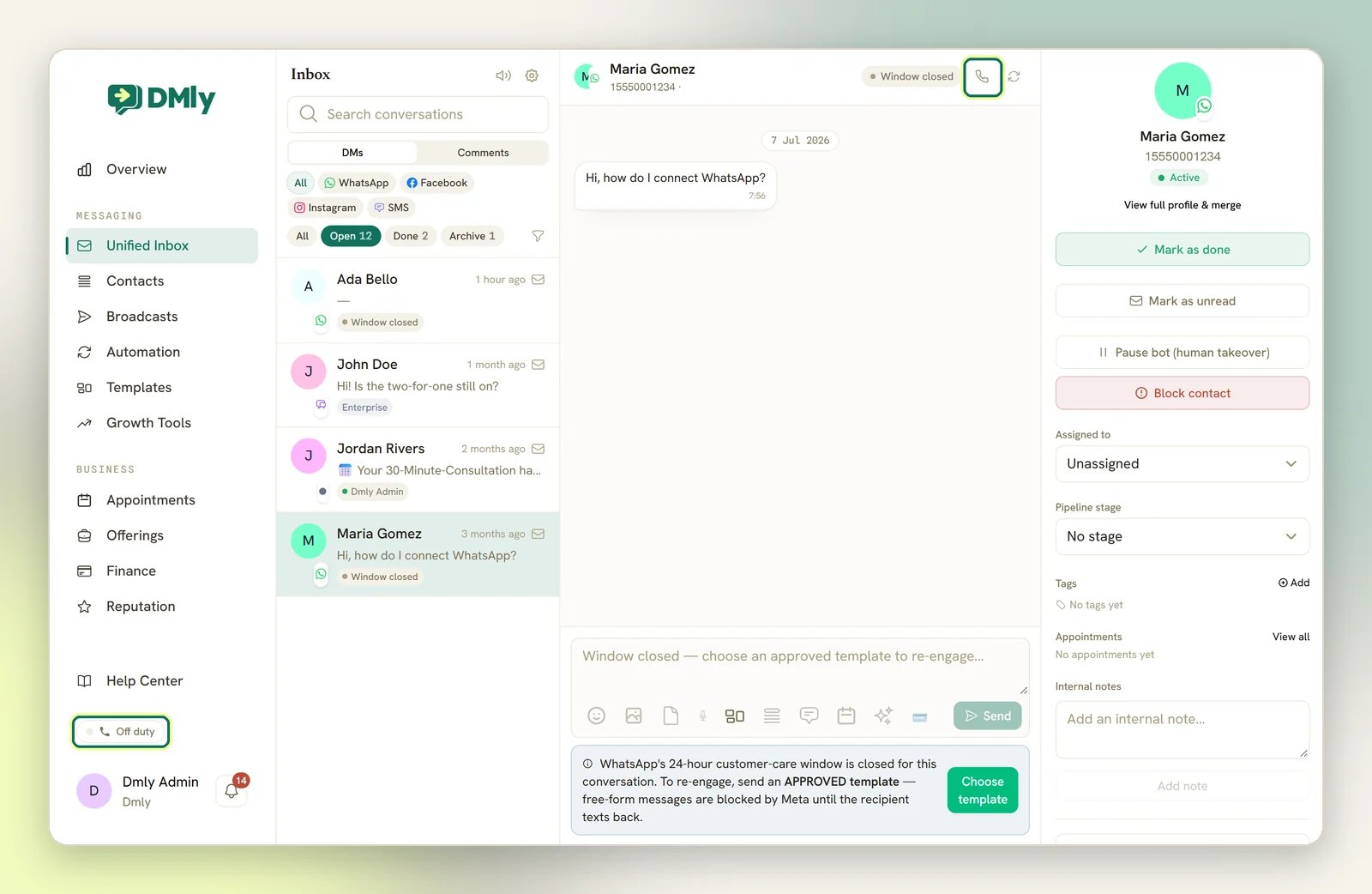
How a contact grants permission
Two things record it. Both last 7 days and both belong to one of your WhatsApp numbers, not to your workspace:
Either one happening again refreshes the 7 days from that moment. A DECLINED reply
records a refusal instead and clears any permission that number had, so calls from it are
refused until the contact grants it again.
Permission is per number, so a grant on one of your WhatsApp numbers never lets you call
from another. Nothing in DMLY displays a contact’s permission state, so a lapsed window
shows up as the refusal message above rather than as a greyed-out button.
What still limits an outbound call
- Your own number’s country decides whether you can call at all. WhatsApp allows business-initiated calls from every country its Cloud API covers except five: numbers registered in the US, Canada, Egypt, Vietnam or Nigeria cannot place them. On one of those numbers every outbound call is refused before DMLY dials, with WhatsApp doesn’t support outbound calls from business numbers in this number’s country yet. Customers can still call you on it. Where your contact is has no bearing on this: a number that can call can call anywhere, and a number that can’t, can’t call anyone. (Meta revises the list over time, so a refusal today is not permanent.)
- Outbound minutes are billed by Meta, as the Calling tab says. Inbound calls are free and global.
- Passing the permission check is not the same as the call being answered. Once DMLY dials, the call bar walks through Calling…, Ringing… and Connecting…, and it can end at No answer or Connection lost like any phone call. Treat outbound as the less-travelled route: where it matters that you get through, asking the contact to call you is the shorter path, and it skips permission, billing and the country list at once.
Calling out is the newer and narrower half of WhatsApp calling, and every condition above has
to line up for one attempt. If you are setting this up for a team, get inbound working first
(that is the part contacts will actually use) and treat outbound as a bonus rather than
something to build a process on.
Receive a call
Inbound calls ring the team members who have marked themselves available for calls. Only available users ring, so nobody is interrupted because a teammate left a tab open. The toggle sits in the sidebar and reads On call duty when you are available and Off duty when you are not; it is English only, whatever your interface language. When you answer, the call bar shows Connecting… and then the live call, ending at Call ended. The bar lives outside the conversation, so you can move around DMLY mid-call without dropping it. Several people can ring for the same call. The first to accept gets it; everyone else’s ringer simply stops with no message, and anyone who had already clicked Answer sees Answered elsewhere. If you have DMLY open in more than one tab, only one tab rings. Answering a call does not assign the conversation; do that separately if you want the contact routed back to you. See Assign a chat.Ask a contact for calling permission
Add the Call Permission node to a flow to ask a contact to allow voice calls, with a message like Can our support team call you about your order?. The node has ACCEPTED and DECLINED exits, so you can branch on the answer. An ACCEPTED reply does two things: it takes that exit so the flow can carry on, and it records 7 days of call permission on the number that asked. A DECLINED reply takes the other exit and records the refusal. See Place a call. See Flow builder.Follow up automatically after a call
Calls behave like any other event in DMLY. Four call events can start a flow and are sent as webhooks:- Incoming call: a customer has started a call, before it is answered.
- Call completed: the call connected and finished.
- Missed call: nobody answered.
- Call declined: the call was declined.
See how calling is going
The Overview page shows two call tiles, Calls and Call answer rate. Both appear only while the active channel is a WhatsApp one; switch to any other channel and neither renders. Call answer rate is the share of all calls that were completed. The total counts outbound calls alongside missed, declined and no-answer ones, so it is not a measure of how many inbound calls your team picked up.Troubleshooting
An outbound call is refused straight away
An outbound call is refused straight away
Read the message; DMLY names the reason.This contact has not granted call permission. Send a call-permission request first. means
there is no live permission on the number you are calling from: either the contact never
granted it, the 7 days have run out, or they granted it on a different one of your numbers.
Send a Call Permission request from a flow, or wait for them to call you.WhatsApp doesn’t support outbound calls from business numbers in this number’s country
yet. Customers can still call you on it. means the number you are calling from is
registered in one of the five countries WhatsApp bars business-initiated calls from: the
US, Canada, Egypt, Vietnam or Nigeria. No permission changes it, and neither does calling a
different contact; it applies to every outbound call on that number.Inbound calls are unaffected by either: they are free, global, and need no permission, so
asking the contact to call you is always the shortest route.
The call dials but never connects
The call dials but never connects
A call that passes the permission and country checks then behaves like any phone call, and it
can end without connecting: the call bar shows No answer when the contact doesn’t pick up,
and Connection lost when the audio link drops. A no-answer is written into the
conversation, so you can at least see the attempt happened.There is nothing to configure on your side for this. If getting through matters, don’t keep
redialling: message the contact and ask them to call you back. An inbound call needs no
permission, isn’t billed to you, and isn’t subject to the country list, so it is the route
that works when an outbound attempt doesn’t.
Nothing rings for a teammate
Nothing rings for a teammate
Only users who have marked themselves available for calls will ring. Check their
availability before assuming a fault.
Connect WhatsApp
Connect the number calling runs on.
Inbox overview
Everything else you can do in a conversation.
Flow builder
Ask for call permission and follow up after calls.
Notifications
Stay on top of new conversations and mentions.