

.json. There is no Excel export, and no scheduled or emailed
report; anything beyond those comes out of the REST API.
Exports are not gated by your plan. What you can export depends on your role and permissions.
See Roles and permissions.
Contacts
Your contact list as
salesbot-contacts.csv.Products
Your product catalogue as
salesbot-products.csv.CSAT report
Survey responses as CSV or a formatted PDF.
Team performance
Per-agent activity as CSV or a formatted PDF.
Finance report
Every payment you collected as CSV, or a formatted PDF.
Ads report
One row per Click-to-WhatsApp ad as
click-to-whatsapp-ads.csv, or a formatted PDF.Export your contacts
The contacts export gives you every contact in the workspace, not just the ones who have messaged on the channel you’re currently viewing. Contacts belong to the workspace, not to a channel. The file issalesbot-contacts.csv with these columns:
The
country_code column is always empty, on every row. It exists so the export matches the
layout the contacts importer expects; the country code is already part of phone. Don’t
build anything that reads it.
Export your products
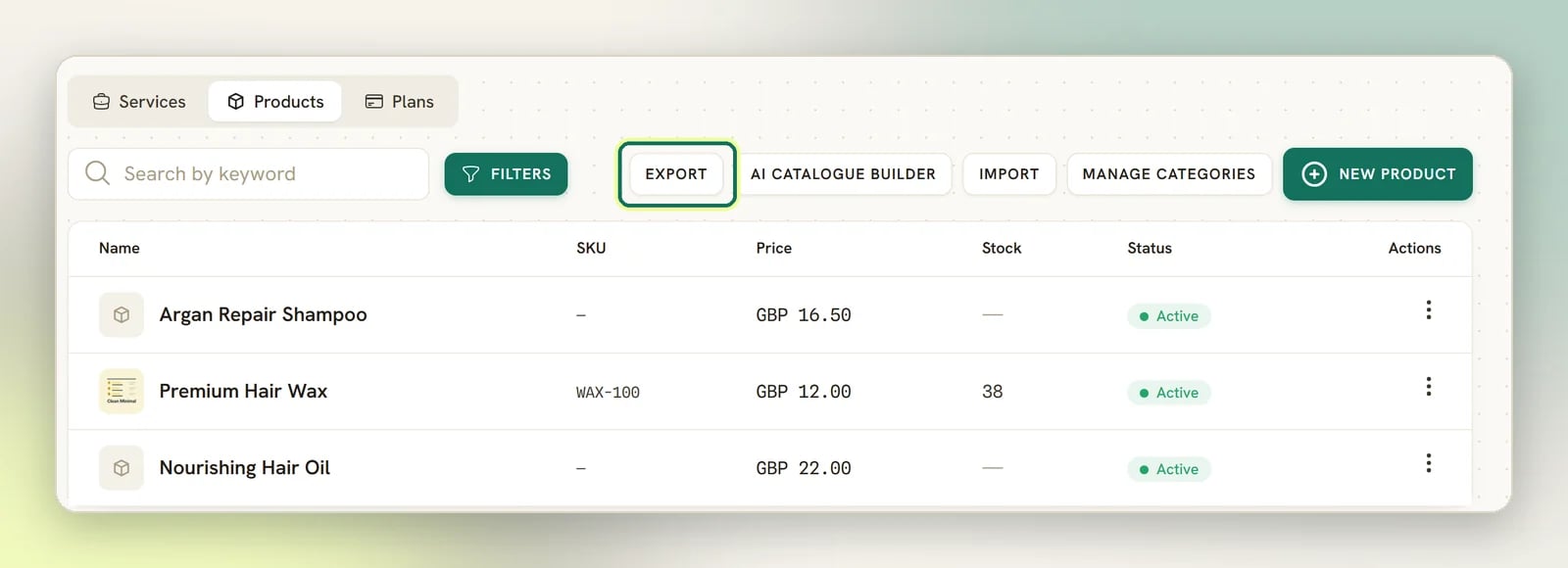
The products export is the whole catalogue, every time; it has no filters and ignores whatever you’re looking at on screen. Products come out in the order they’re sorted in the catalogue. The file issalesbot-products.csv and covers name, sku, price, cost_price,
currency, tax_rate, tax_inclusive, track_stock, stock_quantity,
low_stock_threshold, category, active and description.
Services and Plans do not export. Only products do.
To export, open Offerings, go to the Products tab, and select Export in the row of buttons at the top (with Import and AI Catalogue Builder).
Export your reports
Configurations → Reports holds six tabs (Team, Appointments, Finance, Ads, CSAT and Logs) and every one of them exports the same way, from the same three buttons in its top-right corner:
1
CSV
The report’s underlying rows: every CSAT survey, one row per agent’s totals, every
individual appointment booking, every payment you collected in the window, one row per ad, or
every log entry for the selected channel matching the current filters and date range (capped
at the most recent 5,000 log rows). Workspace-level log entries such as invoices, appointments
and webhook deliveries are left out of the Logs CSV and the Logs PDF, even though the list on
screen shows them; see Reading the Logs page. Not the
Appointments tab’s By service and By staff breakdown tables; those are summaries, not
row data, so they only appear in the PDF.The Finance tab’s file is
finance.csv, newest payment first, with the columns Paid at,
Client, Invoice, Method, Status, Gross, Tip, Refunded, Net,
Currency and Reference. It counts exactly the payments behind that tab’s Money in
tile, so the file and the screen agree. See Finance report.The Ads tab’s file is click-to-whatsapp-ads.csv, busiest ad first, with the columns
Ad ID, Headline, Type, Conversations, Messages, New contacts,
Impressions and Clicks, plus Revenue, Currency, Spend, Spend currency
and Cost per conversation when your role can view Finance. It splits the tab’s single
Ad cell into three columns, and Type carries the plain value (ad or post) rather
than the From an ad wording on screen. Spend, impressions and clicks come from a connected
Meta ad account, and are empty cells rather than 0 where nothing has synced. See
Ads report.2
A formatted version of the single report you’re looking at: the same header and accent
styling as an invoice PDF, with metric tiles, bar charts and data tables.The Ads tab’s PDF works like the rest: metric tiles, a Busiest ads bar chart once
there is more than one ad (the top 8 by conversations, with a line saying so when there are
more), and a table listing every ad. It downloads even when the window is empty, with a line
saying there were no ad-referred conversations in that range.
3
Workspace report
One PDF covering CSAT, Team performance and Appointments, plus a Finance section when
your role can view Finance, plus an Ads section when there is an ad
to report in the window. Every section shares the same date window: the trailing 30 days.
Available from any of the six tabs.The two optional sections are gated on different things. Finance is gated on permission:
it appears only for someone allowed to see money. Ads is gated on content: it appears
when there is an ad to report in those 30 days, meaning an ad that got a message or, with a
Meta ad account connected, an ad that spent money. With neither, there is no ads page at
all, not even an empty one. A teammate who cannot see money still gets the ads section,
minus its Revenue column and Ad spend total. So the document runs to five sections
at most (CSAT, Team performance, Appointments, Finance and Ads), four when there was no ad
to report in those 30 days, and three for a teammate without permission to view Finance
in that same workspace.Logs is the only tab never in it. The activity feed is deliberately left out, because it
is noise in a report you would share with someone; export the Logs tab on its own if you
need it. The button’s hover hint reads Download every report as a single PDF., which still
promises more than the file delivers: Logs is never in it, and Finance is there only for
someone allowed to see money.
Exporting from Reports needs the separate Export reports permission, on top of whatever
lets you view Reports in the first place. Three more role rules reach the files. A teammate
without View team appointments gets only their own bookings, both in the Appointments tab’s
own exports and in the Appointments section of the Workspace report. The Finance tab,
its CSV and its PDF all need permission to view Finance, the same permission that opens
invoices, payments and orders; without it the Workspace report still downloads, simply
without its Finance section. And the same permission decides how much of the Ads CSV, the
Ads PDF and the ads section of the Workspace report you get: a teammate who cannot view
Finance still gets all three, with the money taken out. The Ads PDF and the ads section of the
Workspace report lose the Revenue and Ad spend figures; the CSV loses its
Revenue, Currency, Spend, Spend currency and Cost per conversation columns. The money is stripped out of the file itself, not just
hidden on screen. See
Roles and permissions.
What doesn’t export
The dashboard numbers
The dashboard numbers
Overview has no export. The KPI cards, the Message volume chart,
the Broadcast funnel, Flow outcomes and Contact sources are on-screen only. If
you need those numbers in a spreadsheet, read the underlying records through the API and do
your own totals.
Appointments and payments now export; conversations still don't
Appointments and payments now export; conversations still don't
Two things moved out of this list. The Appointments tab on Reports exports a CSV of every
booking in the filtered window, plus a PDF with the same By service / By staff
breakdowns you see on screen. The Finance tab exports one row per payment you collected in
the window, which is as close to a payments export as DMLY gets. See
Export your reports above.Conversation transcripts still have no download button anywhere in the app. Pull those records
through the API instead. Invoices are the other exception outside Reports: an individual
invoice downloads as a PDF from Finance → Invoices → the row’s dropdown →
Download PDF. There is no bulk invoice export.
Anything on a schedule
Anything on a schedule
DMLY doesn’t email you a report or drop a file anywhere on a timer. Every export is something
you download yourself, when you ask for it.
Get the rest through the API
For anything without an export, the REST API is the route. It returns JSON, so it suits a spreadsheet tool that can import from a URL, a reporting tool, or an automation platform like n8n.1
Create an API key
Keys are minted per workspace and carry the workspace with them, so no workspace ID appears
in any URL. See Authentication.
2
Call the endpoint you need
Browse the API reference for contacts, appointments,
invoices, payments and the rest. Lists paginate, so page through them for a full extract.
3
Or get pushed to instead of pulling
If you want a running record rather than a snapshot, subscribe to
webhooks and have each event land in your own system as it
happens.