

Every survey your automations send is recorded and reported on the CSAT report: response rate, average score, a score breakdown, a trend chart, and every individual response, filterable by date and exportable as CSV or PDF. See Read the results below. One exception: a reply to the out-of-window
dmly_csat template is not scored, so that survey stays Awaiting reply. See Surveys sent outside the 24-hour window. Design the survey itself around what happens next (escalate unhappy contacts, ask happy ones for a review): the branching below is still what actually reacts to a score the moment it arrives.Ask for a score
Add a CSAT Survey node to a flow in the flow builder.1
Place the node where the conversation ends
A survey lands best after the work is done: after a support reply, after an appointment, after an order. Put a delay in front of it so you are not interrupting the conversation you are asking about.
2
Write the question
The default is How would you rate our support today?. Rewrite it in your own words: one short question, about one thing.
3
Choose a 3-point or 5-point scale
Ratings are shown as stars. The lowest option is labelled Poor and the highest Excellent by default, and you can change both.A 3-point survey arrives as tappable buttons, which is the fastest thing to answer. A 5-point survey arrives as a list the contact opens and picks from: more granular, one extra tap.
4
Route each score
Every score gets its own output port, so you decide branch by branch what a 1 means and what a 5 means. The builder’s own advice: Each score is its own port — route detractors straight to a human.
Send happy responders to a Google review
The strongest use of CSAT is turning a good score into a public review while the goodwill is fresh. DMLY ships this as a ready-made automation template, Post-chat CSAT → Google review. Start from it rather than building the pattern by hand:- An agent sends an outgoing message (the conversation is over).
- An hour passes.
- The CSAT Survey node asks for a 5-point rating.
- Happy scores get a short thank-you, then a Request Google review node.
- Unhappy scores are assigned to a person instead, so a human picks the conversation up.
Read the results
In the sidebar, under Configurations, select Reports, then select the CSAT tab. Reports opens on Team, so CSAT is one click further. This is DMLY’s dashboard for every survey your automations have sent. Surveys only go out on WhatsApp, because the CSAT Survey node is only offered in WhatsApp automations.1
Open Reports
Configurations → Reports, then select the CSAT tab. Team, Appointments, Finance, Ads and Logs are the others, and CSAT sits fifth of the six, between Ads and Logs. Finance appears only if your role can view Finance, so on some accounts the strip is five tabs rather than six.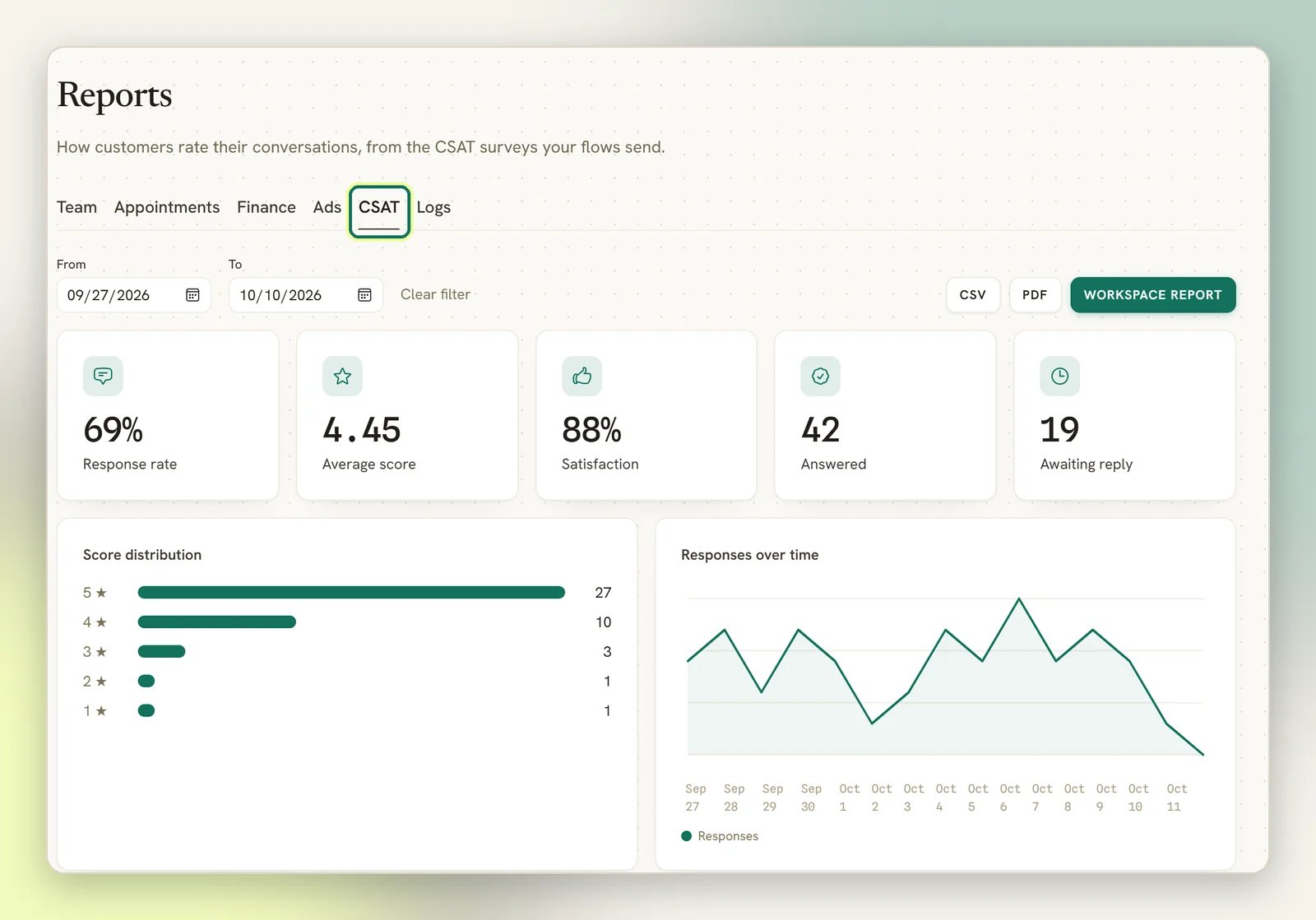
2
Read the headline numbers
Five cards summarise the window: Response rate, Average score, Satisfaction, Answered and Awaiting reply.
3
Filter by date
Set From and To to narrow the window. Leave both blank and the report defaults to the trailing 30 days.
4
Export or download a PDF
CSV gives you every survey in the window: sent time, answered time, contact, status, score, scale and question. PDF downloads a formatted CSAT report; Workspace report downloads one PDF covering CSAT, Team performance and Appointments together, plus a Finance section when your role can view Finance and an Ads section when there is an ad to report: one that got a message, or, with an ad account connected, one that spent money. Logs is never in it, and it always covers the trailing 30 days rather than the window you set here. See Exporting reports.
What the numbers mean
Response rate is
answered ÷ (sent + answered). A survey that failed to send (a permanent delivery failure) is excluded from that total and reported separately: the page shows “N survey(s) failed to send and are excluded from the response rate” beneath the cards whenever any exist. A survey still waiting on a reply counts as sent, not as a failure; it just hasn’t resolved yet.
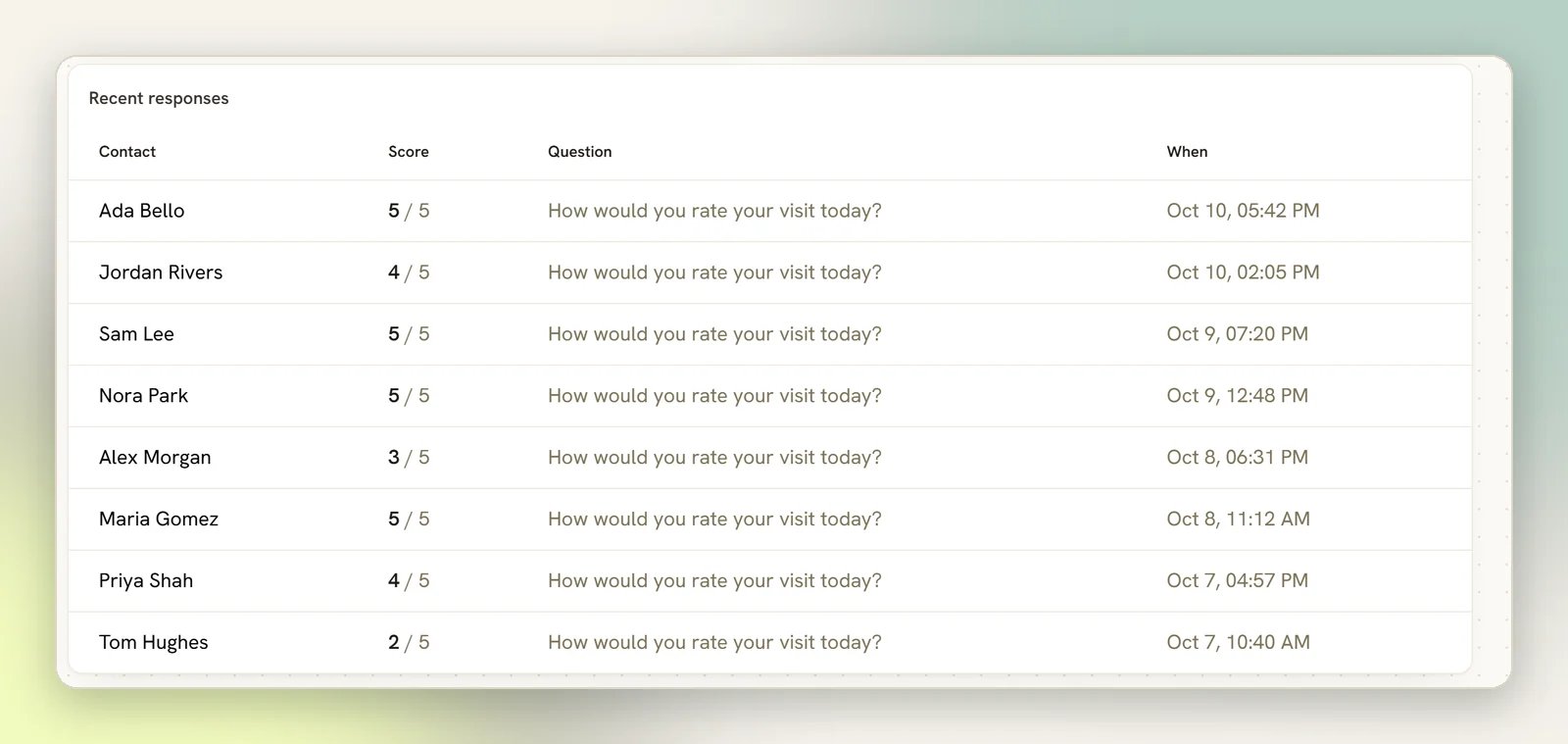
Below the cards, Score distribution bar-charts every answered survey by score, and Responses over time lines up the daily count of answered surveys across the window. Recent responses lists the last ten answers with the contact, score, question and when they answered.
Beyond the dashboard
For one automation’s own delivery detail (runs, messages sent, last run, a paginated activity feed of what it sent), open Analytics on the automation itself. See Automation overview. Flow outcomes on Overview shows where survey-carrying runs end up; a survey still waiting on a reply sits in the Waiting group there.Want a score on the contact record itself, to filter or segment by it? Add a Tag Action node on each score’s path before the branch continues, e.g. a
csat-1 … csat-5 tag. The CSAT report answers “how are we doing”; a tag answers “which contacts said what”, filterable in Contacts.Surveys sent outside the 24-hour window
WhatsApp only lets you send a freeform message within 24 hours of the contact’s last message. Past that, you need an approved template. See Message templates and WhatsApp limits.What happens when the window has closed
What happens when the window has closed
A 5-point survey falls back to the built-in
dmly_csat template, which must be approved by Meta for your workspace before it can send. If it is not approved, the node tries the normal send and records that the window was closed.A 3-point survey has no matching template, so it can only send inside the window.If your surveys stop arriving for older conversations, that fallback template is the first thing to check.Replies to the dmly_csat template do not work like the in-window survey. Its buttons send back text such as “5 - Excellent”, which matches none of the score branches, so no score branch runs and the score is not recorded. The survey stays Awaiting reply on the report.Nobody is answering the survey
Nobody is answering the survey
Usually timing. A survey that arrives mid-conversation gets ignored; one that arrives days later gets ignored too. Put a short delay after the last message, keep the question to one line, and prefer the 3-point scale; buttons are answered more often than a list.If nothing at all is sending, start at Automation not triggering.
Next
Team performance
Another tab on Reports: assignments, replies and response times per teammate.
Finance report
The money tab on Reports: what came in, what was billed and what is still owed.
Ads report
The tab before CSAT: what each Click-to-WhatsApp ad returned.
Exporting reports
Every export across Reports, in one place.