

Two things to know before you sell a pass
Both of these surprise people, and both are how the product genuinely behaves today. Neither is a setting you can change. Price your passes with that in mind.What a credit is
A credit is a whole number held against a Contact. Not money, not a discount, not a booking. Just a count of prepaid visits. Behind that number is a ledger: one row per movement, each recording the change and the balance that resulted. The ledger is only ever added to. Nothing edits or deletes a past row, so the history of a client’s pass is permanent and auditable, and the balance is always the sum of what happened. Two consequences worth knowing:- A balance can never go negative. An attempt to spend more than a client has is rejected outright, not allowed to overdraw.
- Credits are per contact, not per plan. Sell the same client two passes and they get one bigger balance, not two separate passes you can tell apart at redemption time.
Worked example: a 10-class pass
You run a studio. You want to sell a pass of 10 classes, and you want each class booking to take one class off the pass. That is two pieces of setup: the plan that gives out the 10, and the service that takes one back.1
Create the plan
Go to Offerings → Plans and select New plan. Name it (for example, 10-class
pass) and set its price. For Billing type, choose One-time: a pass is bought
once. Recurring is for a membership that rebills on an Interval.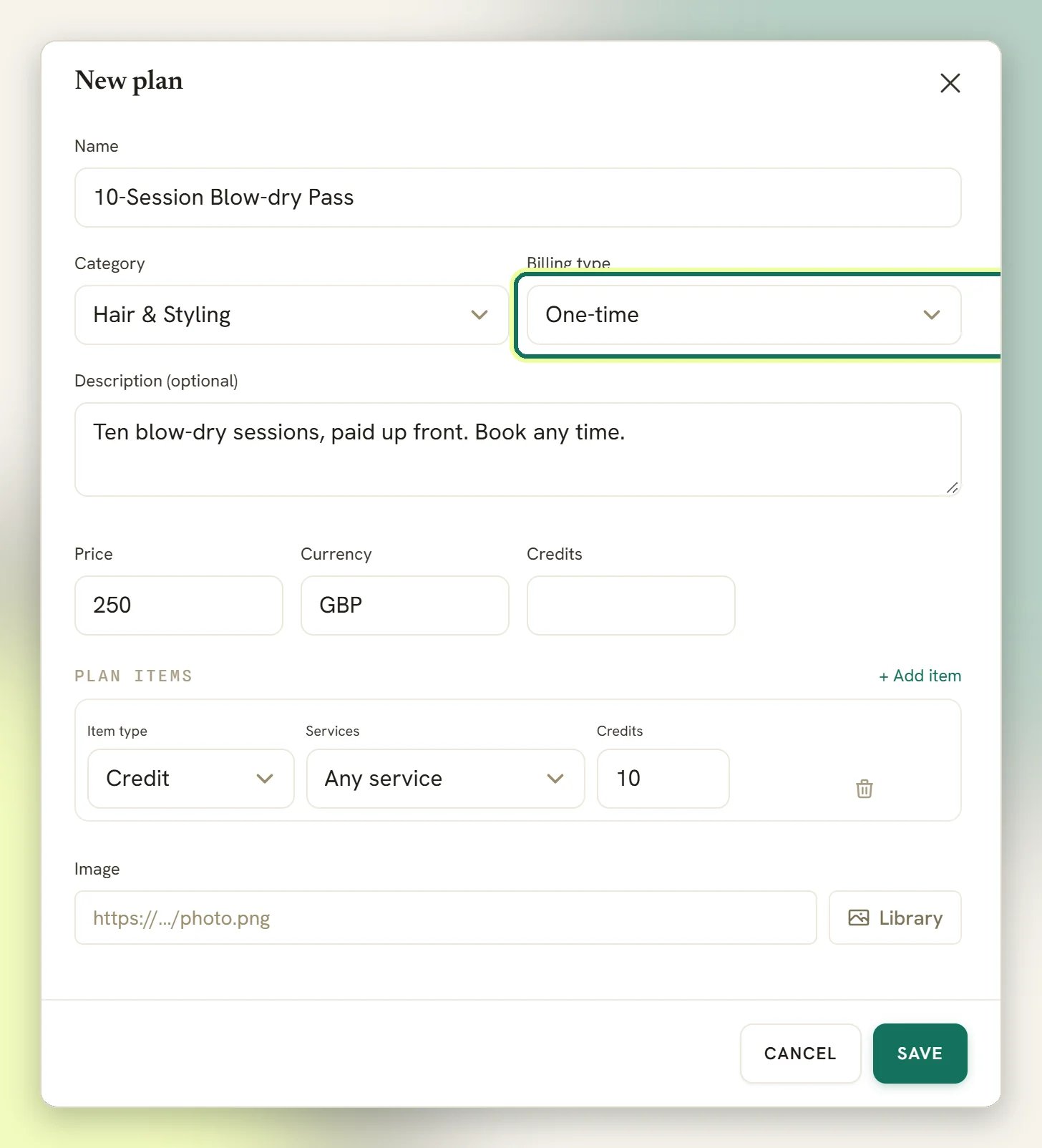
2
Add the credits as a plan item
Under Plan items, select Add item. Set Item type to Credit and set
Credits to 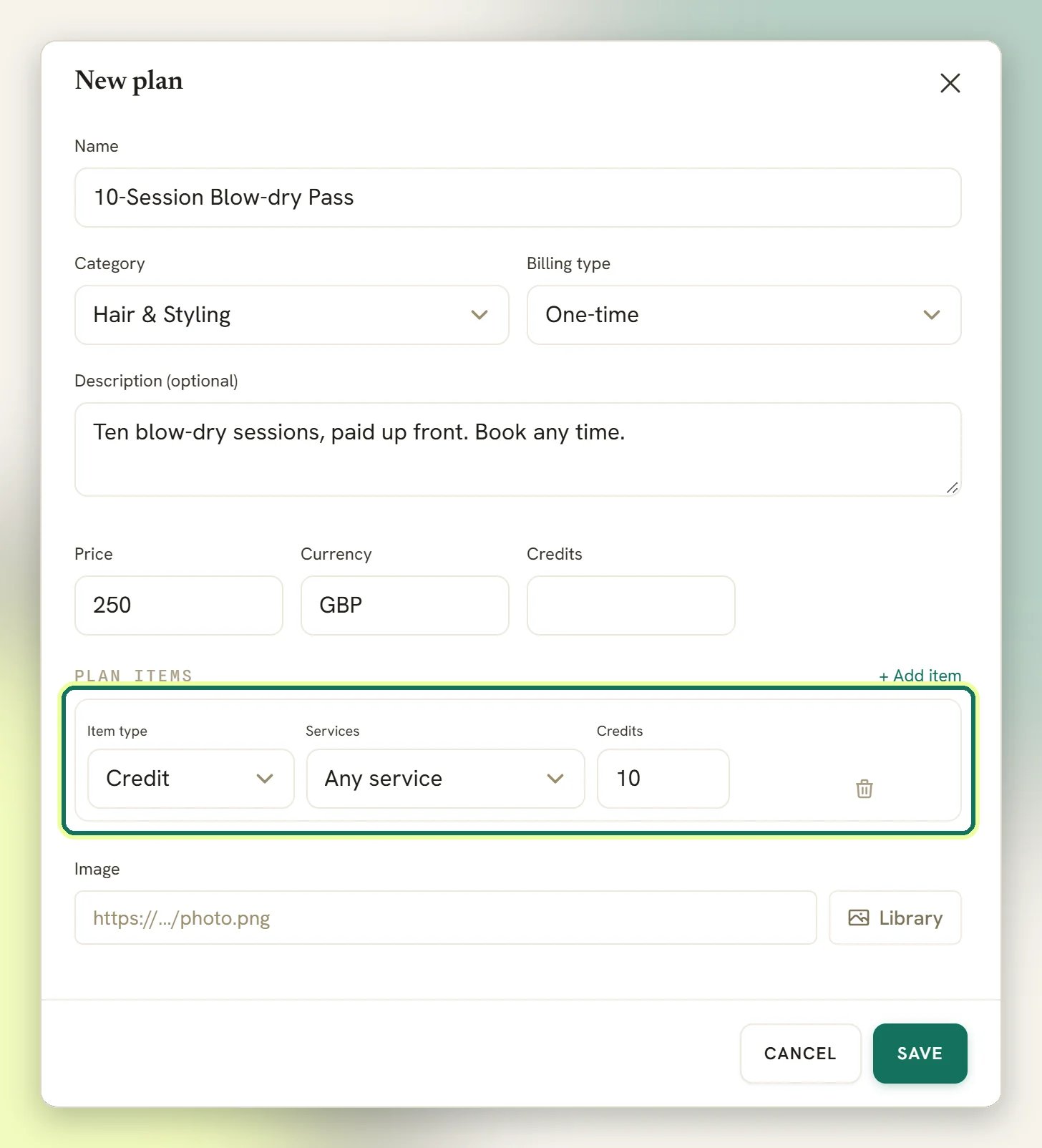
10. Leave the service as Any service. As noted above, attaching a
service here labels the row but does not restrict where the credits get spent.Credit items decide the number. If you add credit items, their total is what the client
receives.3
Set the credit cost on the class
Go to Offerings → Services and open the class. Set Credit cost to 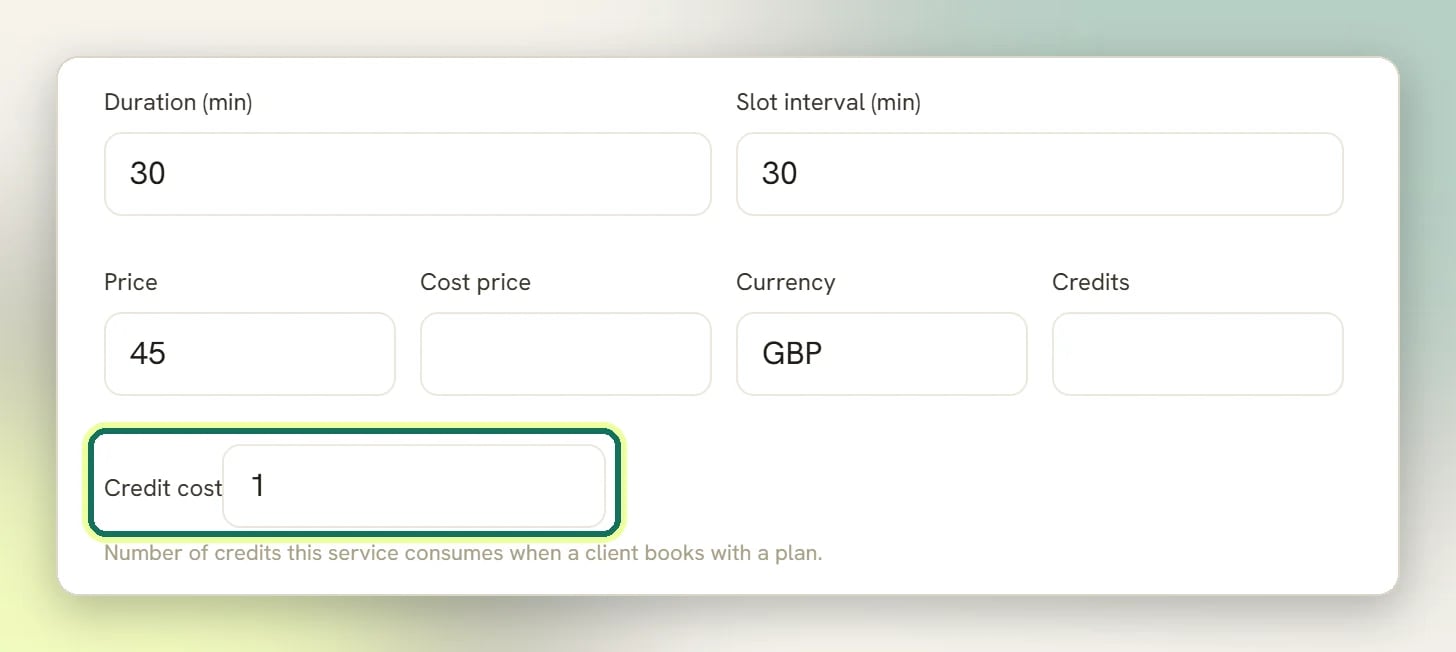
1. DMLY
describes it on the form itself: Number of credits this service consumes when a client
books with a plan.A service with Credit cost blank or 0 never touches the wallet, no matter how many
credits the client holds.4
Issue the credits to the client
Credits reach a client when you add them by hand on the client profile, when you create a
subscription from the plan in Finance → Subscriptions, or when an
automation issues them. See Issuing credits below; this is the step
with the sharpest edges.
A service form has a Credit cost field and a separate Credits field. Only Credit
cost does anything. Credits is saved and then read by nothing; leave it blank and
ignore it.
Issuing credits
There are three ways credits get into a wallet. By hand, from the client profile. The client profile has an Add credits button. It takes Credits (the amount), a Package name (optional), an Expiry date (optional) and Notes, and puts the credits straight into the wallet. Naming a grant (say “Blowout ×5”) makes it show as a package on the profile, with the credits it has left. Unnamed grants show under a generic label, soonest expiry first, and used up or lapsed grants are hidden. Spending still draws from one pooled balance, whatever the grant is called. The expiry date has to be today or later; a past date is rejected. This is the most direct route, and the one to reach for when you are correcting a balance. Leave the date blank and the credits never expire; set one and the unused remainder is clawed back after that day ends (see When credits expire). From a plan, via a subscription. Creating a subscription from a plan in Finance snapshots the plan’s items, grants the credits, and converts the contact to a client. Creating the subscription never charges anything. See One-time or recurring? for how the money and the next cycle’s credits are connected. From an automation. A flow can issue credits to the contact it is running for. That is the route to use when credits should follow something that happened in a conversation rather than a purchase you keyed in. A flow’s Create Subscription node creates a subscription from a plan, and so grants that plan’s credits too.Spending credits
On booking. When a client books a service with a Credit cost above0, DMLY takes
that many credits, once per booking. It takes the credit only when the client has the
balance for it.
This is safe against double-spending. A double-clicked booking button or a retried background
job cannot take the credit twice; the booking itself records which ledger row paid for it, and
a second attempt finds it already paid.
From an automation. A flow can deduct credits directly. If the balance is too low, the
flow does not fail; it takes a separate path you can wire up for exactly that case, or
carries on down its normal path if you have not wired one. Use that branch to send a
WhatsApp message offering a top-up.
When credits expire
Whether a credit expires depends on how it got into the wallet:
The date means the whole day. Credits that expire on July 20 are still spendable on
July 20; they go overnight after it. That is also why Add credits refuses a date in the
past: a grant that lapsed before it landed would be taken back the same night it was given.
Only what the client provably didn’t use expires. When a dated grant lapses, DMLY counts
the spending that happened while the grant was live against the soonest-expiring credits the
client held at each moment, so the dated grant is treated as spent first, and undated
credits sitting in the same wallet are not eaten by the claw-back. A client who bought a
10-class pass with a 90-day expiry and used 7 classes loses 3.
The claw-back is an ordinary ledger row, not an edit: Source expiry, a negative
change, and a note like
Expired 3 unused credits (granted 2026-04-18). The history stays
append-only, and the balance is still the sum of the rows.
An expiry never starts a flow and never sends a webhook. It doesn’t count as Credits
used, and it can’t set off the low-credit warning: those react to spending, not to
overnight housekeeping.
The low-credit warning
DMLY can start a flow when a client is running out of credits, the natural moment to send a WhatsApp message offering the next pass. It is narrower than it sounds, so read the rule before you build the flow. The threshold is 3, and you cannot change it. Not per workspace, not per plan, not per service. Three. It fires on the way down, once. The warning fires when a deduction takes a balance from above 3 to 3 or below.4 → 3 fires. 5 → 1 fires. It fires once on that crossing, and then
not again as the client keeps spending: 3 → 2 and 2 → 1 are silent, because the balance
was already at or below 3 when they started.
Only spending triggers it. Issuing credits never fires the warning, whatever the balance
lands on. A client granted 2 credits sits at 2 in silence. An
expiry doesn’t fire it either; the overnight claw-back can take a
balance from 10 to 1 without a word.
So the practical shape of it: each pass gets you exactly one low-credit warning, at the moment
the client drops to 3 or fewer remaining. Build the flow to make that one message count.
Two other credit moments can start a flow: credits being issued, and credits being used. All
three are also webhook topics (Credits issued, Credits
used and Credits low), if you want them in another system.
In the flow builder these are the Credits issued and Credits used triggers, in the
offerings group. Credits used fires on every spend except credits clawed back at expiry.
A failed trigger never damages the ledger. If the automation errors, the credit movement still
stands; the balance is correct even when the message never goes out.
Seeing a client’s credits
A client’s credit history is on their client profile, showing the latest 50 movements. That is the record to check when someone disputes how many classes they have left: each row shows what changed, the balance that resulted and (on a grant) the date in the Expires column, and no row was ever edited after the fact.One-time or recurring?
One-time
A package bought once: the 10-class pass, a block of six massages. The client gets the
credits and spends them down. Nothing rebills, and the credits never expire.
Recurring
A membership on an Interval (day, week, month or year). The client gets the credits
when the subscription is created, and each cycle’s credits lapse when that cycle ends.
Whether the wallet tops up again depends on auto-charge. See below.
Recurring credits only top up if auto-charge is on
A recurring subscription re-grants its credits when a renewal is actually charged, and that only happens when the client has a saved card. Creating a subscription charges nothing: you send the client a card-capture link with Set up auto-charge, and once they complete it the daily sweep charges that card each period and grants the period’s credits. Each cycle’s grant expires when that cycle ends, so a paid-up membership doesn’t pile old credits into the wallet. The subscriptions table on the client profile has an Auto-charge column so you can see which are set up. If a charge fails, DMLY retries (three attempts, two days apart) and pauses the subscription if all three fail. Without auto-charge, DMLY still bills each period. On each renewal date the overnight sweep (02:00) rolls the period forward, raises that period’s invoice and sends it to the client with a pay link. A free plan gets no invoice. After 3 unpaid periods the subscription is paused. So do not raise a separate invoice or payment link for the period yourself: the client would be billed twice. What the sweep does not do is grant credits, and paying that invoice grants none either. A “4 classes a month” membership sold that way gives the client 4 credits at purchase (gone at the end of that first period, used or not) and never tops up again, however many months they pay for. Nothing warns you about it. Each cycle’s credits are yours to issue with Add credits.What else a plan can bundle
Credits are one kind of plan item. A plan item can also be:- Service: a service included in the bundle.
- Product: a physical item bundled in, with a Quantity. See Products.
- Credit: the wallet grant covered above.
Why can't I stop a massage pass being spent on haircuts?
Why can't I stop a massage pass being spent on haircuts?
Because the wallet has no service dimension. The balance is a single number per contact, and
a booking that costs credits takes from that number without asking where the credits came
from. The plan item’s service field records your intent, but nothing enforces it at
redemption.If separation matters commercially, the practical workaround is to set Credit cost only
on the services you are genuinely happy for any credit to buy, and to handle the rest as
ordinary paid bookings (see Appointment payments).
A client's pass is wrong. Can I just edit the balance?
A client's pass is wrong. Can I just edit the balance?
There is no editing of the ledger. Rows are never changed or removed; the balance is what
the rows add up to. A correction is a new movement in the other direction, which is why the
history stays trustworthy.If the client is short of credits, Add credits on their profile issues the
difference. Describe it in Notes, so the next person reading the profile can see what you
did and why.If the client has too many credits, there is no button for it. Nothing in the interface
takes credits off a balance; the only way to do it is to build a flow
with a Deduct Credits node and run the contact through it.One thing to steer clear of on the way: the Edit credits action on a subscription in
Finance describes itself as Adjust the credit balance available on
this subscription, but it does not touch the client’s wallet or the ledger. All it changes is
how many credits future renewals of that subscription grant.