

Meetings is not in the sidebar
If you are hunting the sidebar for a Meetings item, stop. It is not there and it is not hidden behind a plan, a permission or a setting. The sidebar’s business section lists Appointments, Offerings, Finance and Reputation. That is all.Meetings still works if you land on it, and nothing about it is broken. It is simply older
than the pages that replaced it, and DMLY no longer routes you there. Use
Appointments and Offerings instead.
1
Open a conversation
Go to Messaging → Unified Inbox and open any conversation.
2
Open the booking-link menu
In the message composer’s toolbar, select the calendar icon; its tooltip reads
Insert booking link.
3
Select Manage meeting types
At the bottom of that menu, select Manage meeting types. That opens the meeting types
page.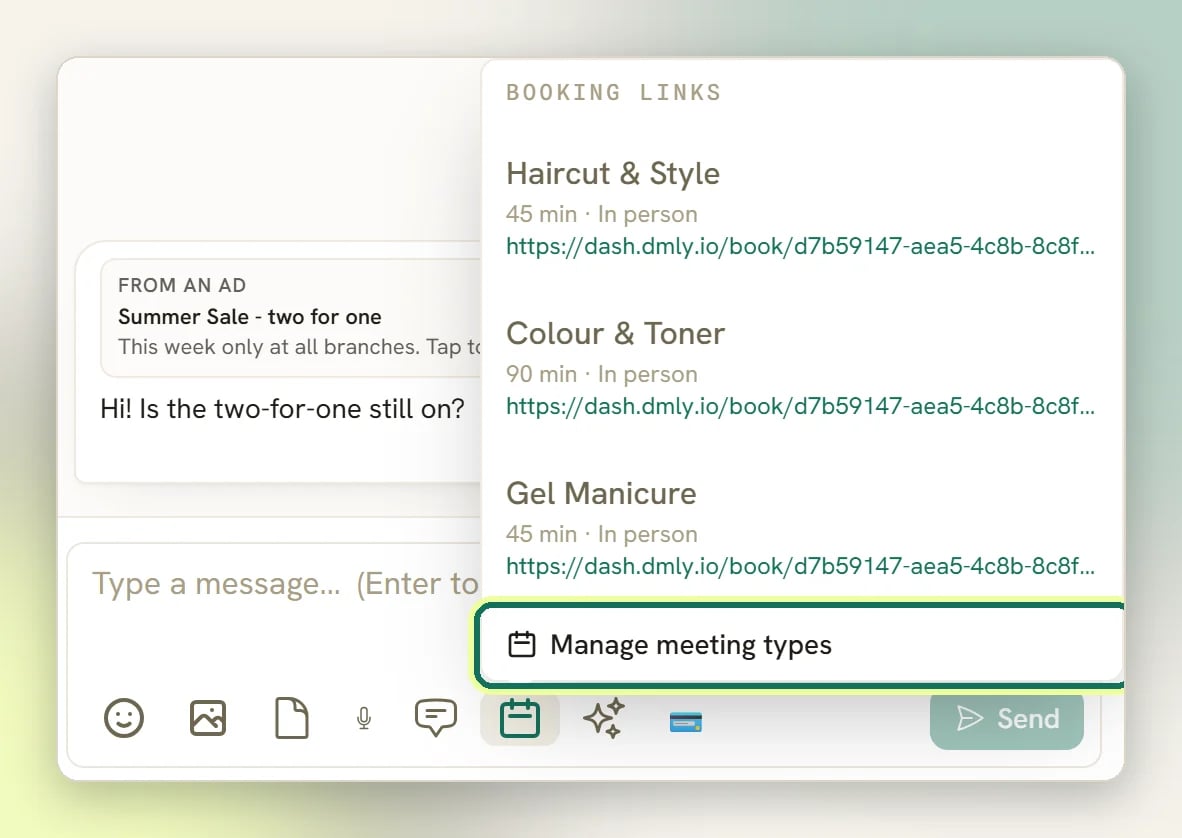
4
Switch to Bookings
From the meeting types page, the Bookings tab is the only way to reach the meetings
list. Nothing else in DMLY links to it.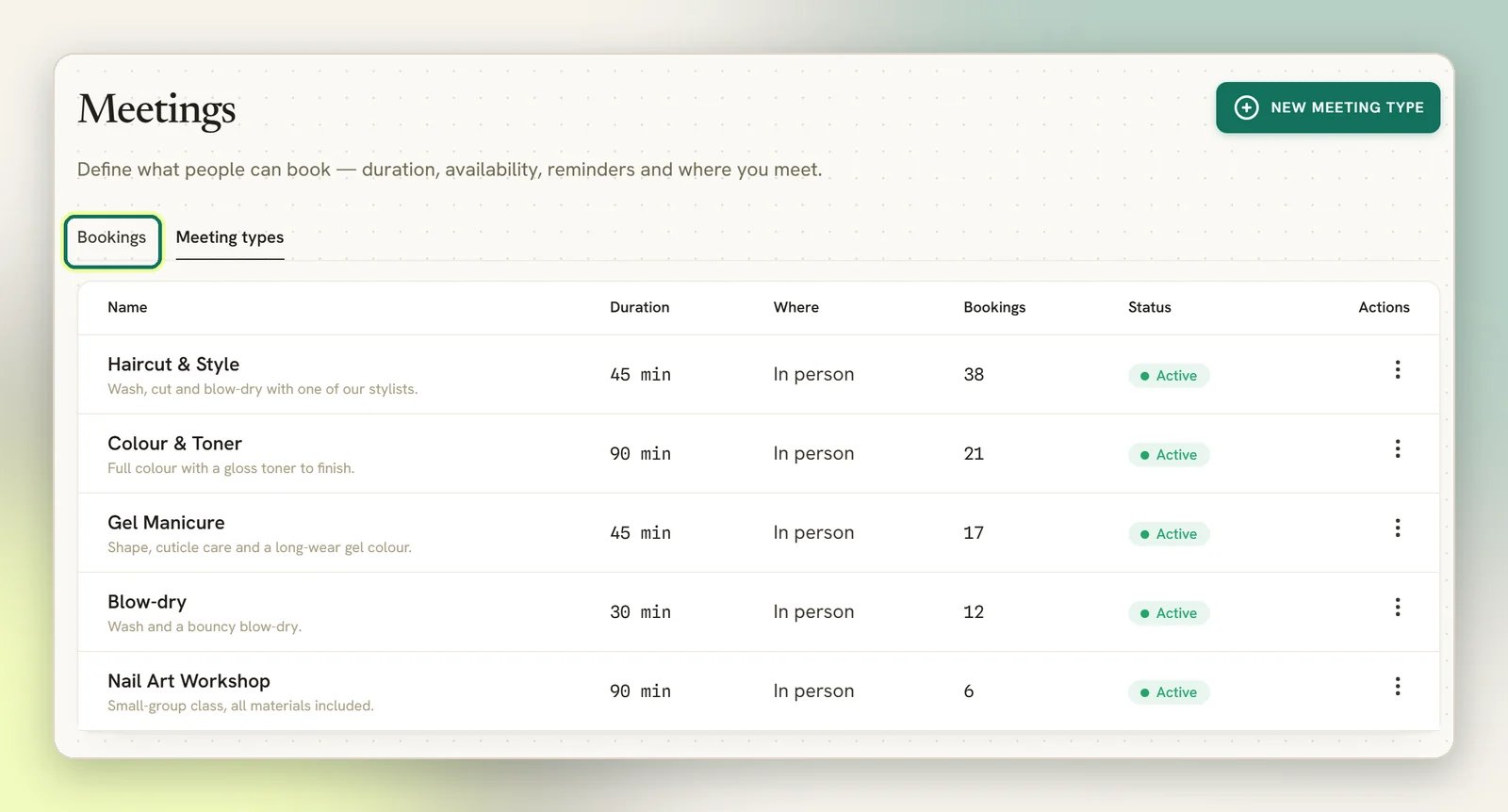
Use these instead
Appointments
The same bookings, with a calendar view, staff, classes and payments. This is where your
bookings live now.
Offerings
Under Services: the same rows a meeting type edits, plus price, category, credits and
payment settings.
What a meeting type is
A meeting type is a Service. The two names describe one thing: DMLY renamed meeting types to services, and the older screen kept the older word. A meeting type sets what someone can book and when:- Duration (min) and Slot interval (min): how long the booking runs, and how far apart the offered start times sit.
- Location: Google Meet (auto link), Zoom (auto link), Phone call, In person, or Custom (your own link/notes). Only Google Meet and Zoom generate a joining link for you; the rest use whatever you type into Location details.
- Weekly availability: the time windows you accept bookings in, per weekday.
- Buffer before and Buffer after: padding around each booking.
- Min notice (min) and Days ahead: how soon someone can book, and how far out.
- Reminders, Confirmation message, Reminder message, Cancellation message.
- Active (available for booking): the on/off switch.
Bookings, cancel and reschedule
The Bookings tab lists confirmed upcoming meetings and past ones, with the Contact, the Meeting, When and the Source it came from. On an upcoming booking you can:- Join Google Meet or Join Zoom Meeting: shown only when the booking has a meeting link, and the label matches the link.
- Open booking page: opens that one booking’s management page in a new tab. That is the page where your contact cancels or reschedules the booking themselves.
- Reschedule: pick a new time from the open slots on that meeting type’s availability, then Confirm new time. If someone takes the slot first, DMLY tells you the time is no longer available.
- Cancel meeting: the contact is notified and the calendar event is removed. The cancellation is recorded as made by an agent.
Google Calendar is optional
Google Calendar is not required. Bookings are recorded either way, and the meeting type editor offers No calendar (don’t sync) on purpose. Without a calendar connected you still take bookings, but:- Meetings do not appear on your Google Calendar, so your own availability elsewhere is not visible to DMLY and DMLY’s bookings are not visible to you outside the app.
- Google Meet links are not generated. The Google Meet (auto link) location has nothing to generate from.
If the page asks you to connect a channel
Open Meetings in a workspace with no connected channel and you get a “connect a channel first” prompt instead of your bookings, even though meeting types are workspace-wide and have nothing to do with channels. Connect a channel (see Channels) and the page loads normally. This is another reason to work in Appointments instead.Why does this page exist at all if nothing links to it?
Why does this page exist at all if nothing links to it?
Meetings came first. Appointments and Offerings were built over the same data and grew past
it, but the old screens were never removed, so old bookmarks keep working. Nothing about
the arrangement is documented as deliberate or as an oversight, so treat Meetings as legacy:
safe to open, not worth building a habit around.